On this page
In short
Technical SEO is the work of optimising your website’s foundation — how fast it loads, how easily search engines can crawl and index it, and how cleanly it’s built — so Google (and now AI tools like ChatGPT) can find, understand, and rank your pages. Get it wrong and even great content stays invisible; get it right and everything else in SEO works better.
If you’ve ever published a page you were proud of and watched it get zero traffic, the problem might not be your writing. It might be that search engines couldn’t properly read your site in the first place. That’s the world of technical SEO — and it’s the part most business owners never see, yet quietly decides whether all your other marketing pays off.
This guide explains technical SEO in plain English: what it is, why it matters for your bottom line, the core areas to care about, and how the rise of AI search in 2026 has made it more important than ever. No jargon for jargon’s sake — just what a business owner actually needs to know.
You won’t need to touch a line of code to follow along. By the end, you’ll understand what technical SEO actually covers, be able to tell whether your own site has a problem, and know exactly which checks to run first — for free — to find out. Whether you plan to fix things yourself or hand them to a developer, you’ll be asking the right questions instead of taking anyone’s word for it.
What is technical SEO?
Technical SEO is the practice of optimising your website’s infrastructure so search engines can crawl, render, index, and rank your pages without friction. If content SEO is about what you say and on-page SEO is about how you say it, technical SEO is about whether search engines can access and understand any of it at all.
Think of your website like a building. Your content is the furniture and the people inside — the reason anyone visits. But technical SEO is the foundation, the plumbing, and the wiring. Nobody compliments a building for its foundation, but if it’s cracked, nothing above it is safe. A beautiful blog post on a slow, broken, or un-crawlable site is a sofa in a house no one can enter.
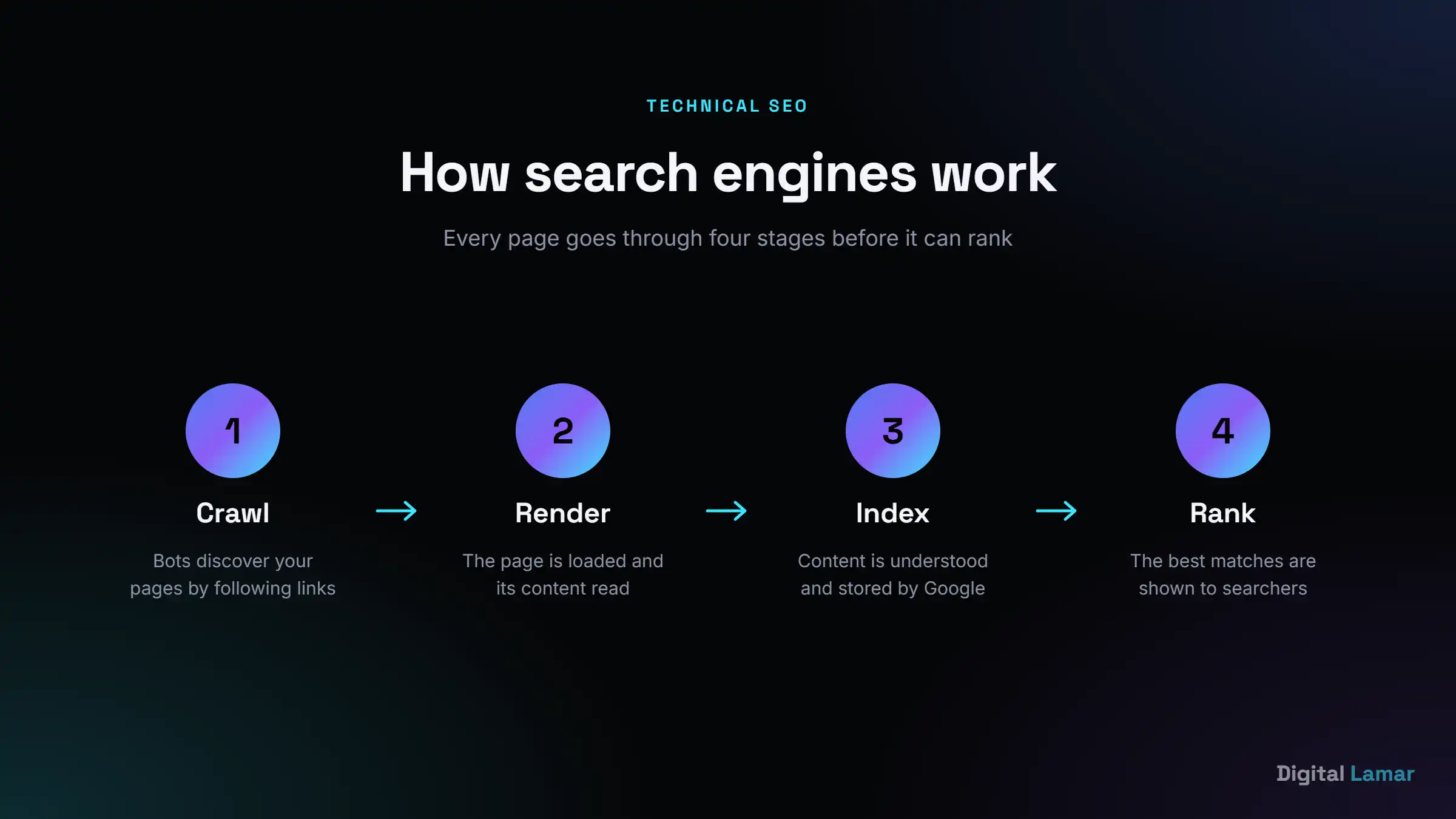
Search engines do three jobs before you can ever rank:
- Crawl — bots (like Googlebot) follow links to discover your pages.
- Render & index — Google loads the page, understands its content, and files it in its giant database.
- Rank — when someone searches, Google pulls the best-matching indexed pages and orders them.
Technical SEO makes the first two steps effortless. If a page can’t be crawled or indexed, it has a zero per cent chance of ranking — no matter how good the content is. That’s why technical SEO comes first.
How technical SEO differs from on-page and off-page SEO
SEO is usually split into three buckets, and it helps to know where technical fits:
- Technical SEO — the foundation. Can search engines access, render, and understand your site? (Speed, crawling, indexing, structure.)
- On-page SEO — the content on each page. Keywords, titles, headings, internal links, and how well a page answers the search.
- Off-page SEO — your reputation across the web. Mainly backlinks and brand mentions that signal authority and trust.
The three work together, but technical is the gatekeeper. You can have the best content (on-page) and a strong backlink profile (off-page), but if a technical issue is blocking indexing, none of it can rank. That’s why an experienced SEO almost always starts an engagement with a technical audit — it’s pointless to pour effort into content on a foundation that’s quietly broken.
Why technical SEO matters (and what bad technical SEO costs you)
Here’s the part that matters to your business: technical problems don’t announce themselves. There’s no error message, no angry phone call. You just quietly lose rankings, traffic, and leads to competitors — and never know why. Let’s make the cost concrete.
- Slow pages lose customers and rankings. More than half of mobile visitors leave a page that takes over three seconds to load. Google also uses speed as a ranking signal — so a slow site loses twice: fewer visitors and lower positions.
- Un-crawlable pages are invisible. A stray setting in your robots.txt file or a “noindex” tag left on by a developer can hide entire sections of your site from Google. We’ve seen businesses accidentally block their most important service pages for months.
- Duplicate or messy URLs split your strength. When the same content lives on several URLs, Google gets confused about which to rank — and your authority gets divided instead of concentrated.
- A broken mobile experience tanks you. Google ranks the mobile version of your site first. If it’s clunky on a phone, that’s the version being judged.
Here’s a typical scenario we see: a business spends months (and a real budget) publishing blog posts and building backlinks, but rankings barely move. The content is good and the links are real — yet a single misconfigured canonical tag is telling Google to ignore half the pages, and a 5-second mobile load time is capping everything else. Once those two technical issues are fixed, the same content and links suddenly start ranking. Nothing about the marketing changed; the foundation was simply unblocked. That’s the quiet power — and quiet cost — of technical SEO.
The flip side is the good news: technical SEO is largely a fix-it-once investment. Unlike ads, where you pay for every click, a clean technical foundation keeps paying off for years and makes every blog post, backlink, and landing page you create work harder. It’s the highest-leverage, least-glamorous work in search engine optimisation.
The 7 core areas of technical SEO
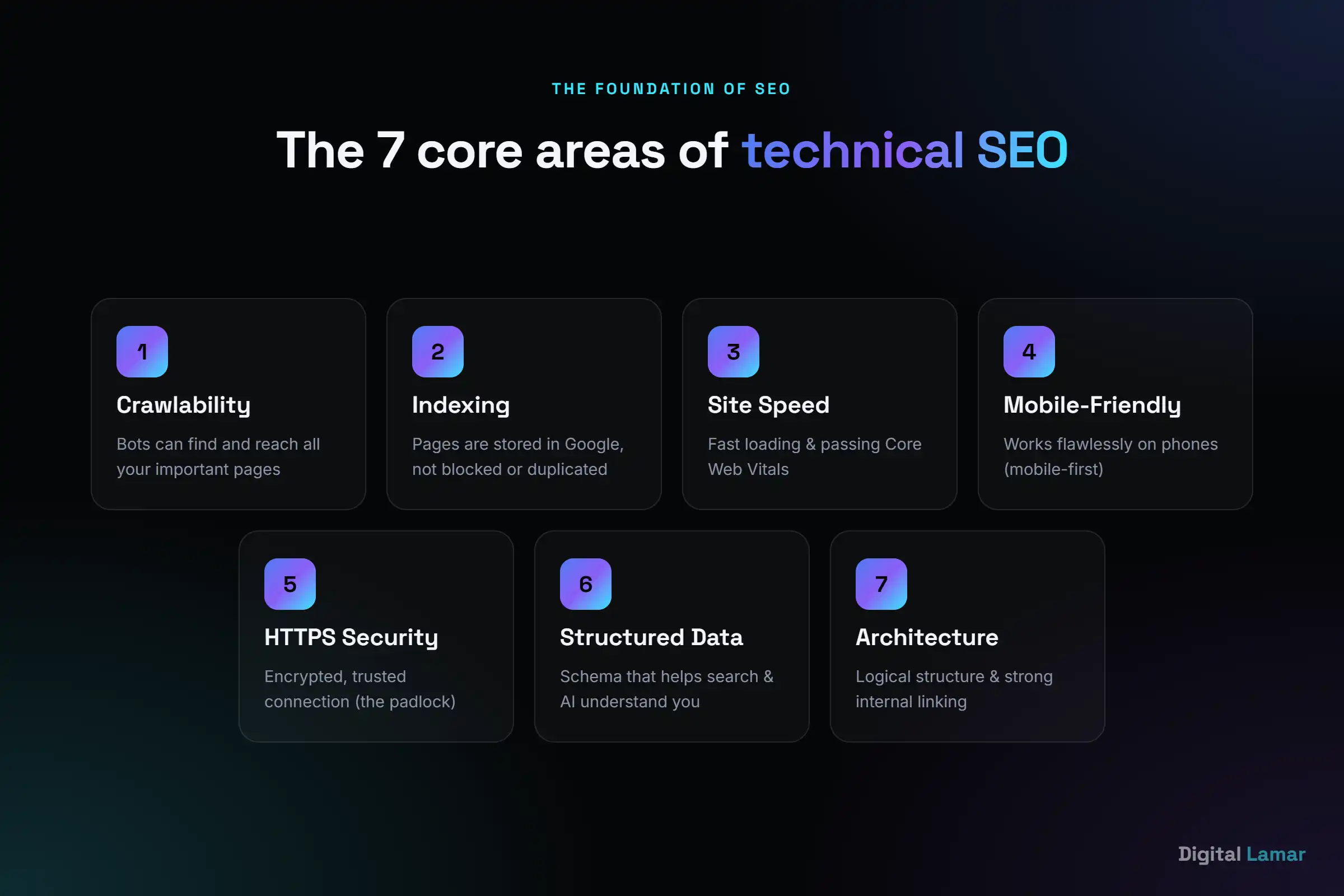
“Technical SEO” is an umbrella term. Underneath it sit seven areas that cover roughly 90% of what matters for most business websites. You don’t need to master them — but knowing they exist helps you ask the right questions (and spot when something’s wrong).
1. Crawlability — can search engines reach your pages?
Crawlability is about letting bots find and access your content. The key tools are your XML sitemap (a map of all your important pages, submitted in Google Search Console) and your robots.txt file (which tells bots where they may and may not go). Large sites also need to think about crawl budget — Google only spends so much time crawling you, so wasting it on low-value or duplicate URLs means your important pages get crawled less often. Why it matters to you: if a page isn’t crawlable, it will never appear in Google — full stop.
2. Indexing — are your pages actually in Google?
Crawling is discovery; indexing is being filed away so you can appear in results. Problems here come from misused noindex tags, canonical tags pointing to the wrong page, or duplicate content. The opposite problem is index bloat — thin, auto-generated pages (think tag archives, filtered “faceted” URLs, or internal search results) flooding the index and diluting your site’s quality in Google’s eyes. Why it matters to you: you can check this in seconds — search site:yourdomain.com in Google to see roughly how many of your pages are indexed, and whether that number looks suspiciously high or low.
3. Site speed & Core Web Vitals
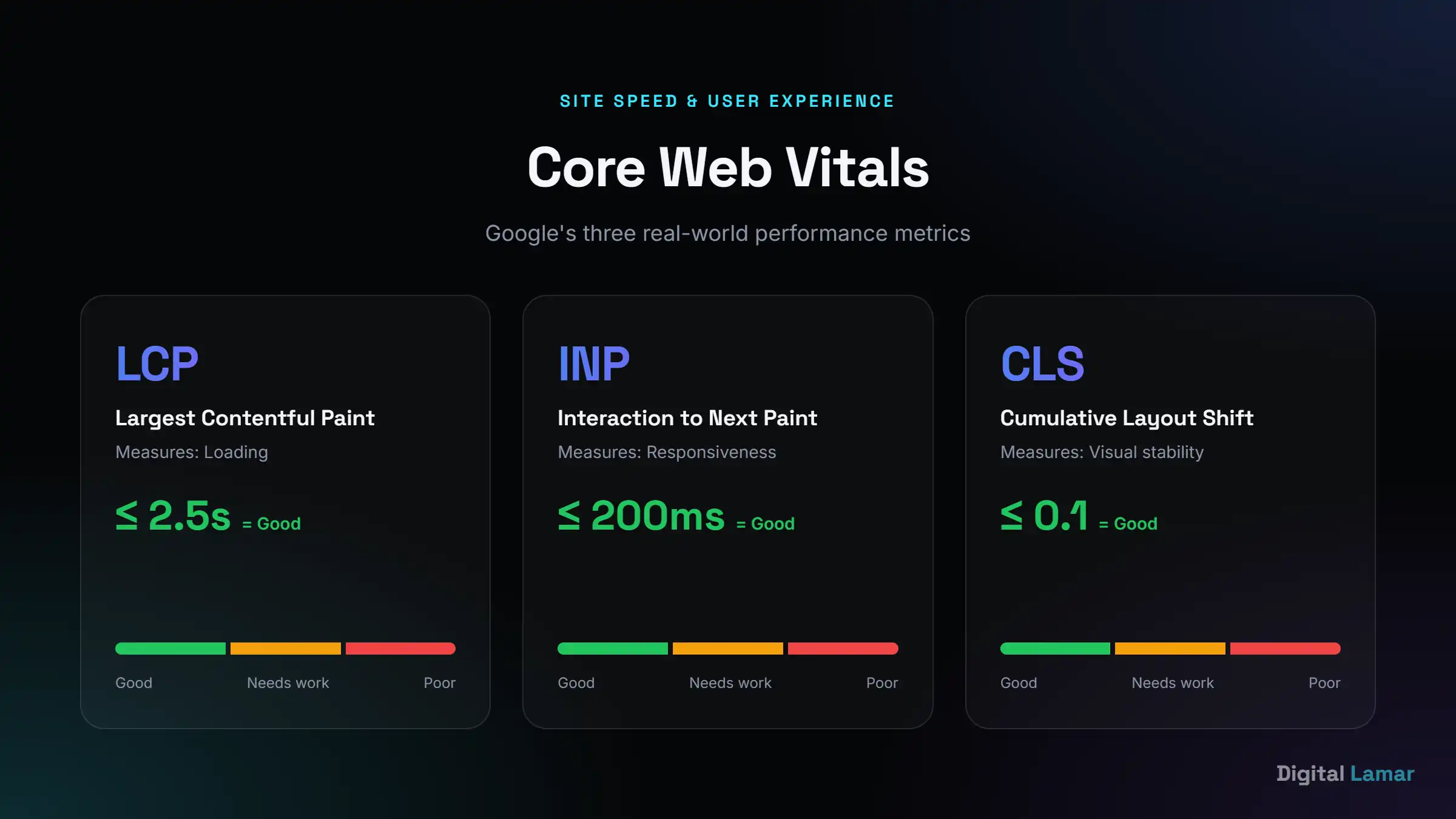
Google measures real-world loading experience with three metrics called Core Web Vitals: LCP (Largest Contentful Paint — how fast the main content loads, aim for under 2.5s), INP (Interaction to Next Paint — how quickly the page responds to a tap or click, under 200ms), and CLS (Cumulative Layout Shift — how much the layout jumps around, under 0.1). The usual culprits behind poor scores are unoptimised images, render-blocking JavaScript and CSS, slow hosting, and bloated page builders. Why it matters to you: speed affects both rankings and conversions, and you can test any page free at PageSpeed Insights — just remember it reflects real Chrome user data, so improvements take a few weeks to show.
4. Mobile-friendliness
Google uses mobile-first indexing — it predominantly judges the mobile version of your site, not the desktop one. That means responsive design, tappable buttons with enough spacing, readable text without zooming, and no content or links hidden on small screens. A common trap is having more content or different internal links on desktop than mobile — since Google indexes mobile, anything missing there effectively doesn’t exist. Why it matters to you: most “near me” and local searches happen on phones, so a poor mobile experience hits exactly the customers who are ready to buy.
5. HTTPS & security
HTTPS (the padlock in the browser bar) encrypts the connection between your site and your visitor. It’s a confirmed ranking signal, and browsers now actively flag non-HTTPS sites as “Not secure” — a warning that scares off customers before they ever see your offer, and one that’s especially damaging on any page that collects contact details or payments. Why it matters to you: this is usually a one-time fix (an SSL certificate, often free from your host or via Let’s Encrypt) and a baseline of trust that customers — and Google — now simply expect.
6. Structured data (schema markup)
Structured data is special code (usually JSON-LD schema markup) that spells out what your content means — that this is a product, a review, an FAQ, a local business with these hours. It powers the rich results you see in Google: star ratings, FAQ drop-downs, prices, and breadcrumbs. Common types worth implementing are Organization, LocalBusiness, Article, FAQPage, Product, and Review. Why it matters to you: it can make your listing bigger and more clickable in the results, and it’s increasingly how AI tools understand and cite your business.
7. Site architecture & internal linking
A logical structure — where important pages are only a few clicks from the homepage, and related pages link to each other — helps both users and bots navigate. A good rule of thumb is the three-click rule: any important page should be reachable within about three clicks of the homepage. Why it matters to you: good internal linking spreads ranking strength (sometimes called “link equity”) to your money pages and stops important content from becoming an orphan page — one with no internal links pointing to it, which both users and Google struggle to find. A fast, well-structured site is also where solid web design and development overlaps directly with SEO.
Other technical factors worth knowing
Beyond the seven pillars, a few more items round out a healthy technical setup — these are the details a professional audit will always check:
- Broken links & redirects. Dead links (404s) waste crawl budget and frustrate users; long redirect chains slow pages and leak link equity. Aim for clean, single-hop redirects.
- Hreflang tags. If you serve multiple countries or languages (say, the UAE in English and Arabic), hreflang tells Google which version to show which audience — preventing the wrong-language page from ranking.
- Breadcrumb navigation. Beyond helping users, breadcrumbs reinforce your site structure for Google and can appear directly in the search result.
- Pagination. Blog archives and product listings spread across many pages need to be handled cleanly so Google understands the sequence and doesn’t treat them as duplicates.
- One clean URL structure. Short, readable, lowercase URLs with hyphens — and no session IDs or endless parameters — make a site easier to crawl and to trust.
Technical SEO in the age of AI search (2026)
Here’s what’s changed — and what most older guides won’t tell you. People no longer only “Google” things. They ask ChatGPT, Perplexity, and Google’s AI Overviews for recommendations. And those AI systems read the web very differently from a human with a browser.
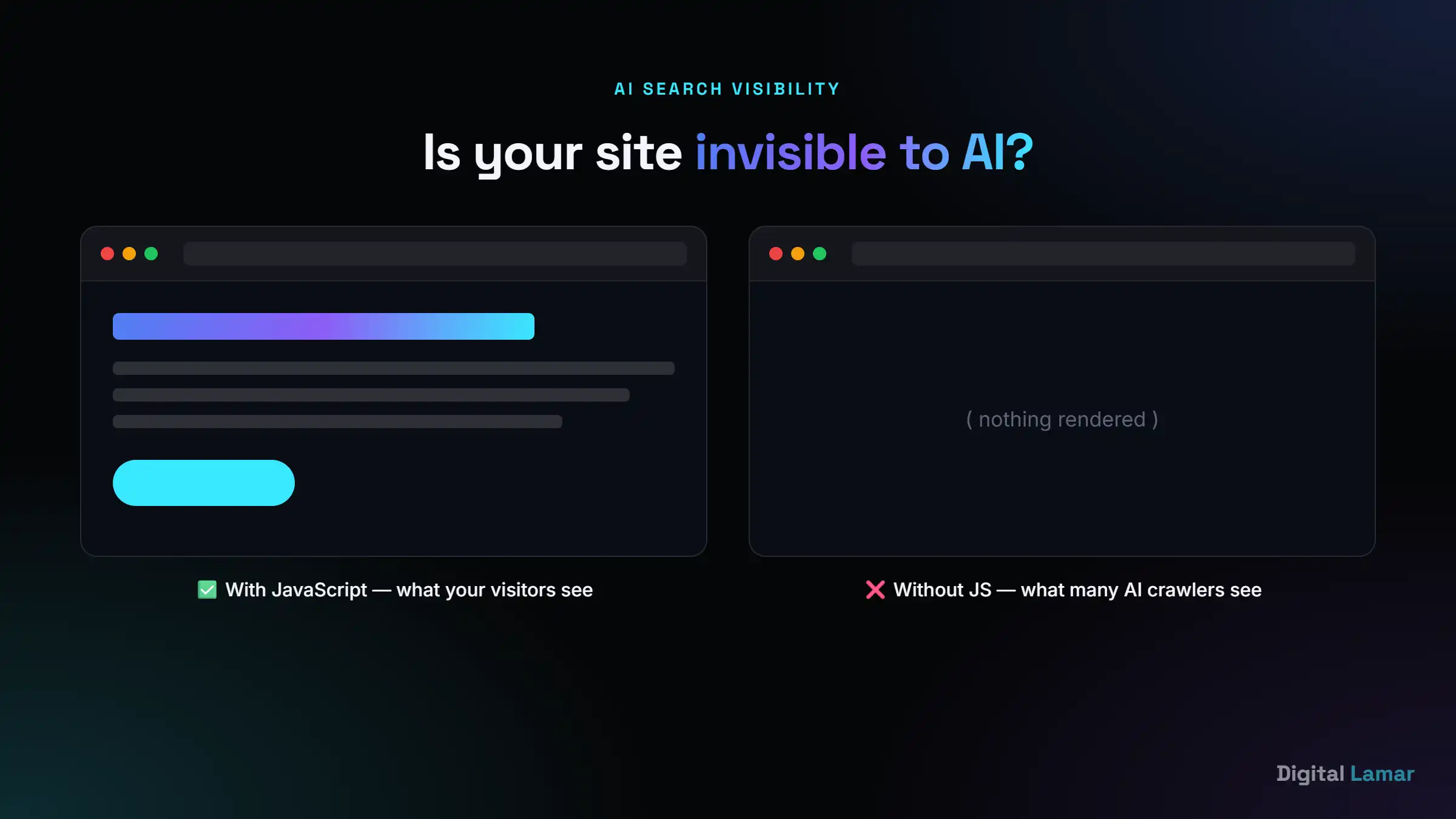
Try this on your own site: turn JavaScript off in your browser and reload. On many modern websites, the page goes completely blank. That’s because the content is “drawn” by JavaScript in the browser rather than served as plain HTML. Google can usually handle this (slowly), but many AI crawlers and bots don’t run JavaScript at all. If your content only appears after JavaScript runs, you may be invisible to the very tools your future customers are asking for advice.
This is where technical SEO and the new world of GEO (Generative Engine Optimisation) and AEO (Answer Engine Optimisation) meet. The fixes are technical: serve real HTML content, keep your site fast and crawlable, use clean structured data so machines understand you, and consider an llms.txt file (a newer standard, like robots.txt but for AI models) to guide AI crawlers to your most important content. In other words, the same technical foundation that ranks you on Google is now what gets you cited by AI.
It’s also worth understanding Google AI Overviews — the AI-generated answers now appearing at the very top of many searches. They pull from pages Google can crawl and trust, and they often cite content that’s clearly structured with headings, concise answers, and schema. A quick way to check your own AI visibility: ask ChatGPT or Perplexity a question your business should answer (“best [your service] in [your city]”) and see whether you appear at all. If you don’t, technical and structural gaps are usually part of the reason. Businesses that nail this early will own a channel their competitors don’t even realise exists yet.
Not sure what’s holding your site back?
Get a free technical SEO audit — we’ll show you exactly what’s costing you rankings and leads, in plain English.
Get a Free Technical SEO AuditWhat is a technical SEO audit? (and which issues to fix first)
A technical SEO audit is a systematic health check of your website — a crawl of every page to surface the issues stopping you from ranking. Tools like Google Search Console (free), Screaming Frog, Ahrefs, or Semrush crawl your site the way Google does and flag what’s broken. Think of it like a mechanic putting your car on a lift: from the driver’s seat everything seems fine, but the inspection underneath reveals the worn parts you’d never have spotted until something failed. Most businesses should run a full technical audit at least once or twice a year, and after any major change — a redesign, a platform migration, or a big batch of new pages.
An audit can return dozens of issues, which is overwhelming. The skill is in prioritisation — fixing what moves the needle, ignoring the noise. Here’s a sensible order for most business sites:
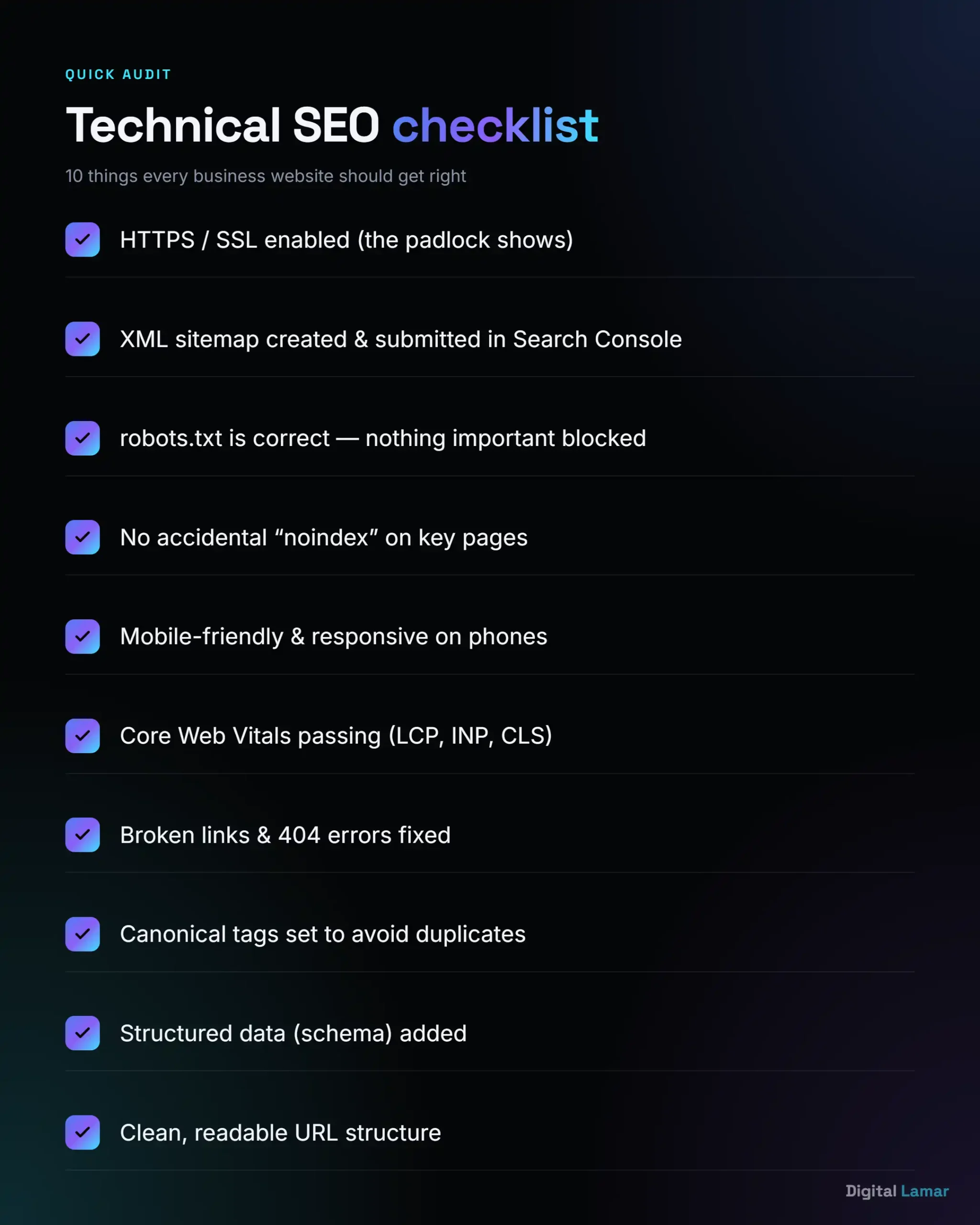
- Indexing blockers first. Any important page that’s accidentally noindexed or blocked in robots.txt — this is an emergency; the page literally can’t rank.
- Broken pages & redirects. 404 errors and long redirect chains waste crawl budget and frustrate users.
- Site speed & Core Web Vitals. Especially on mobile and on your key landing pages.
- Duplicate content & canonicals. Make sure Google knows the one “true” version of each page.
- Mobile usability issues. Anything that breaks on a phone.
- Structured data & internal links. The optimisations that compound over time.
If you do nothing else, log into Google Search Console and check the Pages and Core Web Vitals reports — they’ll show you, for free, what Google currently thinks of your site. For a deeper crawl, Screaming Frog is the industry-standard desktop crawler (free up to 500 URLs), while Ahrefs and Semrush offer cloud site audits that score your site and re-check it on a schedule. Each surfaces slightly different issues, but they all answer the same question: where is your site making it hard for Google to do its job?
5 common technical SEO mistakes (and how to spot them)
After auditing hundreds of websites, the same handful of issues come up again and again — and most owners have no idea they’re there. Here are the ones worth checking today:
- Accidental “noindex” left on after a redesign. Developers often block a site from Google while building it, then forget to remove the block at launch. Spot it: in Search Console, watch for pages dropping out of the index after a redesign.
- Both www and non-www (or http and https) versions live. If
http://,https://,www, and non-wwwall load, Google sees up to four “different” sites splitting your authority. Spot it: type each version into your browser and confirm they all redirect to one. - A slow, image-heavy homepage. Huge uncompressed images are the number-one cause of failing Core Web Vitals. Spot it: run your homepage through PageSpeed Insights and look at the LCP score.
- Orphan and thin pages. Pages with no internal links, or near-empty pages auto-created by your CMS, drag down site quality. Spot it: compare your sitemap count to your indexed count — big gaps signal a problem.
- No structured data at all. Many small-business sites run zero schema markup, leaving rich results and AI citations on the table. Spot it: paste your URL into Google’s Rich Results Test.
The technical SEO tools we actually use
You don’t need an expensive toolkit to do meaningful technical SEO — most of the essentials are free. These are the technical SEO tools we use on client sites every week, in the order a business owner should reach for them:
- Google Search Console (free) — the single most important tool. Shows exactly how Google sees your site: which pages are indexed, which queries you appear for, and whether Core Web Vitals pass. If you use nothing else, use this.
- PageSpeed Insights (free) — paste in any URL and get your Core Web Vitals scores plus a prioritised list of what’s slowing the page down.
- Screaming Frog (free up to 500 URLs) — the industry-standard desktop crawler. It reads your site the way Googlebot does and surfaces broken links, redirect chains, missing meta tags, and noindex accidents in one crawl.
- Semrush or Ahrefs Site Audit (paid) — cloud crawlers that score your site’s technical health, re-check it on a schedule, and track whether fixes actually stick. Worth it once SEO becomes a real channel for you.
- Rich Results Test (free) — paste in a URL and instantly see whether your structured data is valid and eligible for rich results.
The pattern worth noticing: the free Google tools tell you what Google thinks is wrong, and the crawlers tell you where and why. Start free — upgrade only when the size of your site or the stakes justify it.
Can you do technical SEO yourself, or should you hire an expert?
Honest answer: some of it, yes. A business owner can absolutely handle the basics — set up Google Search Console, run PageSpeed Insights, install an SSL certificate, fix obvious broken links, and use a good SEO plugin (like RankMath or Yoast) to manage sitemaps and meta tags. If you’re on WordPress, you’re already most of the way there.
Where it gets tricky is the deeper work: diagnosing why Core Web Vitals are failing, untangling JavaScript-rendering and crawl issues, fixing site-architecture problems on a large site, or implementing structured data correctly. These are the issues that quietly cap your growth and are genuinely hard to self-diagnose — a wrong move (like a misplaced redirect or canonical) can do real damage.
There’s also a cost-of-time angle. Technical SEO has a steep learning curve, and the hours you’d spend learning to diagnose a rendering issue are hours not spent running your business. For many owners, the smart split is to own the basics and ongoing monitoring yourself, then bring in a specialist for the initial deep audit and any heavy fixes — so you’re not paying for a retainer to do work you could handle in ten minutes, but you’re also not gambling your rankings on a guess.
A simple rule: if your site is small, new, and your rankings are roughly where you’d expect — start with the basics yourself. If you’re investing in content and ads but still not ranking, or you’re on a larger or older site, a professional technical audit usually pays for itself fast by removing the invisible ceiling. That’s exactly the kind of work our team handles day to day — finding the foundational issues that hold good businesses back, and fixing them properly.
Want us to handle the technical side?
Explore our SEO ServicesKey takeaways
- Technical SEO is the foundation — it makes sure search engines can crawl, render, and index your site so the rest of your SEO can work.
- Bad technical SEO is invisible but expensive — slow, un-crawlable, or duplicate pages quietly cost you rankings and leads.
- Focus on the seven core areas: crawlability, indexing, speed/Core Web Vitals, mobile, HTTPS, structured data, and architecture.
- AI search raised the stakes — JavaScript-heavy sites can be invisible to ChatGPT and other AI tools; clean technical SEO is now how you get cited.
- Start with a free audit in Google Search Console and PageSpeed Insights — fix indexing blockers first, then speed, then the rest.
Frequently asked questions
What is technical SEO in simple terms?
Technical SEO is optimising your website’s foundation — speed, structure, and code — so search engines can easily find, read, and rank your pages. It’s the behind-the-scenes work that lets your content actually compete.
Why is technical SEO important?
Because if search engines can’t crawl or index your pages, they can’t rank them — no matter how good your content is. Technical SEO removes those barriers and makes every other SEO effort more effective, while improving speed and user experience.
What’s included in technical SEO?
The main elements are crawlability (sitemaps, robots.txt), indexing (canonicals, noindex), site speed and Core Web Vitals, mobile-friendliness, HTTPS security, structured data, and site architecture with internal linking.
How is a technical SEO audit done?
A tool such as Google Search Console, Screaming Frog, Ahrefs, or Semrush crawls your entire site and flags issues. You then prioritise fixes — starting with indexing blockers and broken pages, then speed, then duplicate content and the rest.
Does technical SEO matter for AI search like ChatGPT?
Yes — more than ever. Many AI crawlers don’t run JavaScript, so sites that rely on it to display content can be invisible to them. Fast, crawlable, well-structured sites with clean schema are the ones AI tools can read and cite.
Can I do technical SEO myself?
You can handle the basics — Search Console setup, speed testing, SSL, and an SEO plugin. Deeper issues like JavaScript rendering, Core Web Vitals failures, and structured data usually benefit from a professional, as small mistakes can hurt rankings.