
On this page
- What Ecommerce SEO Is and How It Differs From Regular SEO
- Start With Site Structure: Categories, URLs and Links
- Category and Product Pages: What to Fix on Each
- Product Structured Data and Merchant Center
- Filters Without Crawl Waste
- What to Do With Discontinued and Out-of-Stock Products
- Which Ecommerce Platform Is Best for SEO?
- Content, Links and AI Search for Online Stores
- The Ecommerce SEO Checklist
- Ecommerce SEO in the US, the UAE and Pakistan
- Do It Yourself or Hire Help?
- Key Takeaways
- Frequently Asked Questions
In short
Ecommerce SEO is mostly a structure problem, not a keyword problem. Fix the way your categories, URLs and filters are built first, then tune category and product pages, then add structured data and a Merchant Center feed. Your platform matters less than whether someone on your team owns the technical details. This guide follows Google’s own ecommerce documentation, adds what the Shopify and WooCommerce help centers confirm about their defaults, and puts the US, UAE and Pakistan markets side by side using official figures.
US online stores sold $340.2 billion in the second quarter of 2026, up 12.2 percent on a year earlier, while total retail sales grew 6.7 percent over the same period (US Census Bureau, Q2 2026). Online retail is growing almost twice as fast as the market it sits inside. That is good news for demand and bad news for anyone hoping the competition will stay thin.
Digital Lamar helps businesses in Pakistan, the UAE and the US get found in search, and a familiar story with online stores has nothing to do with keywords. A store launches with a clean theme, adds a few hundred products, switches on every filter the platform offers, and a year later wonders why only a fraction of the catalog shows up in search. Nobody wrote the product copy badly. Google never had a clear path to most of the pages. That gap between what a store sells and what a search engine can actually reach is where a great deal of ecommerce SEO is won or lost.
The pages were never the problem. The paths were.
This guide follows the order we would work in on a real store: structure first, pages second, product data third, then platform, content and the market you sell in. Where a claim comes from Google, a platform vendor or an official statistics body, it is cited in the sentence. Where it is our judgment, we say so.
The number that frames everything below
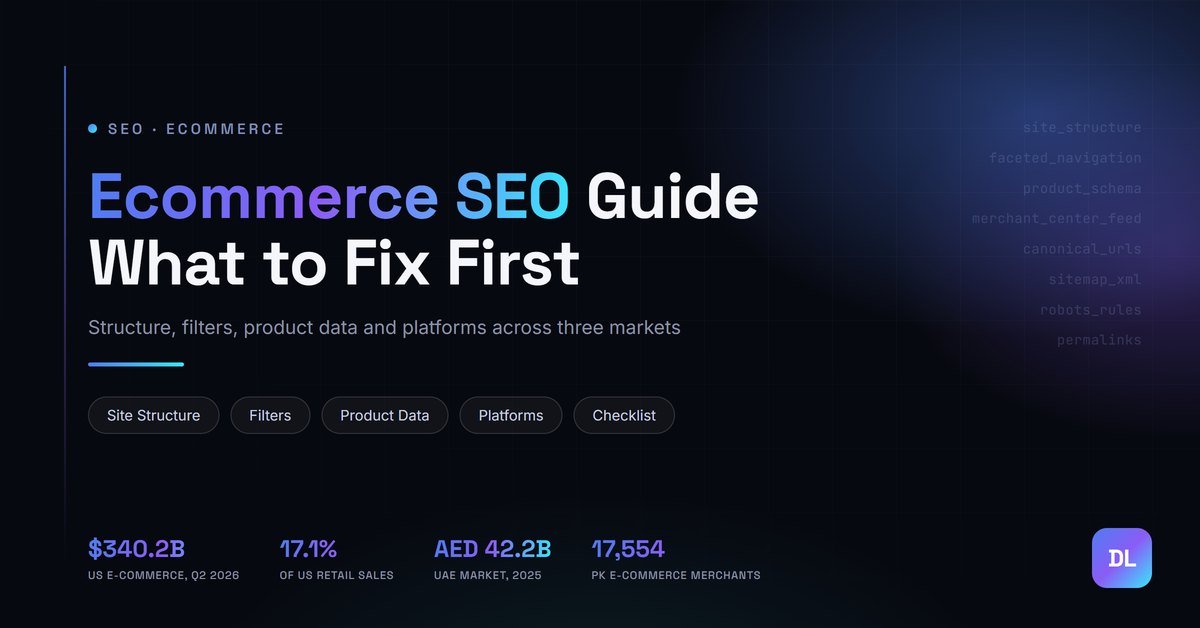
US e-commerce grew 12.2 percent year over year in Q2 2026 while total retail grew 6.7 percent, and online sales now make up 17.1 percent of all US retail sales (seasonally adjusted). Source: US Census Bureau, Quarterly Retail E-Commerce Sales, Q2 2026.
What Ecommerce SEO Is and How It Differs From Regular SEO
Ecommerce SEO is the work of making an online store’s category and product pages easy for search engines to find, understand and rank.
Regular what SEO actually is work revolves around a modest number of pages, each written to answer a question. A store flips that arrangement. It has thousands of near-identical pages built from a template, a navigation system that can multiply those pages into thousands more, and a catalog that changes every week as stock sells out and new lines arrive. The craft is less about writing one excellent page and more about keeping a large, repetitive system clean enough that Google can read it.
That is why the technical layer matters earlier here than it does on a blog. Everything in our guide to technical SEO applies, but the stakes are higher because the page count is. A crawl problem on a ten-page brochure site costs you a page. The same problem on a store can hide a large part of the catalog.
A note on the search term itself. In the US, Semrush records 14,800 monthly searches for “ecommerce seo” and classifies the intent as informational (Semrush, October 2026). Most people typing it are store owners and marketers learning the craft, not shoppers. Google’s own ecommerce documentation ranks first for the term in the same dataset, which is a useful hint about where this guide should anchor its claims: wherever possible, on what Google says rather than on what an SEO tool vendor says.
Start With Site Structure: Categories, URLs and Links
Before you touch a product description, check whether Google can reach your products at all.
Google’s ecommerce documentation is blunt about it. Pages need to be reachable by following links through your site’s navigation, and the documentation recommends linking in a clear hierarchy: menus to category pages, categories to subcategories, subcategories to products (Google Search Central, ecommerce site structure, updated December 2025). It also states that “if category pages don’t include direct links to all products in a category, Googlebot might not find all of your products by crawling alone.” When direct links are not practical, Google points to sitemaps or Merchant Center feeds as the fallback, which is a rescue route and not a plan.
The mechanism matters. Google tells site owners to use <a href> tags for links and not JavaScript events on other elements for navigation. Mega-menus and filter widgets built with scripts that never output a real link are a classic reason whole sections of a store end up invisible.
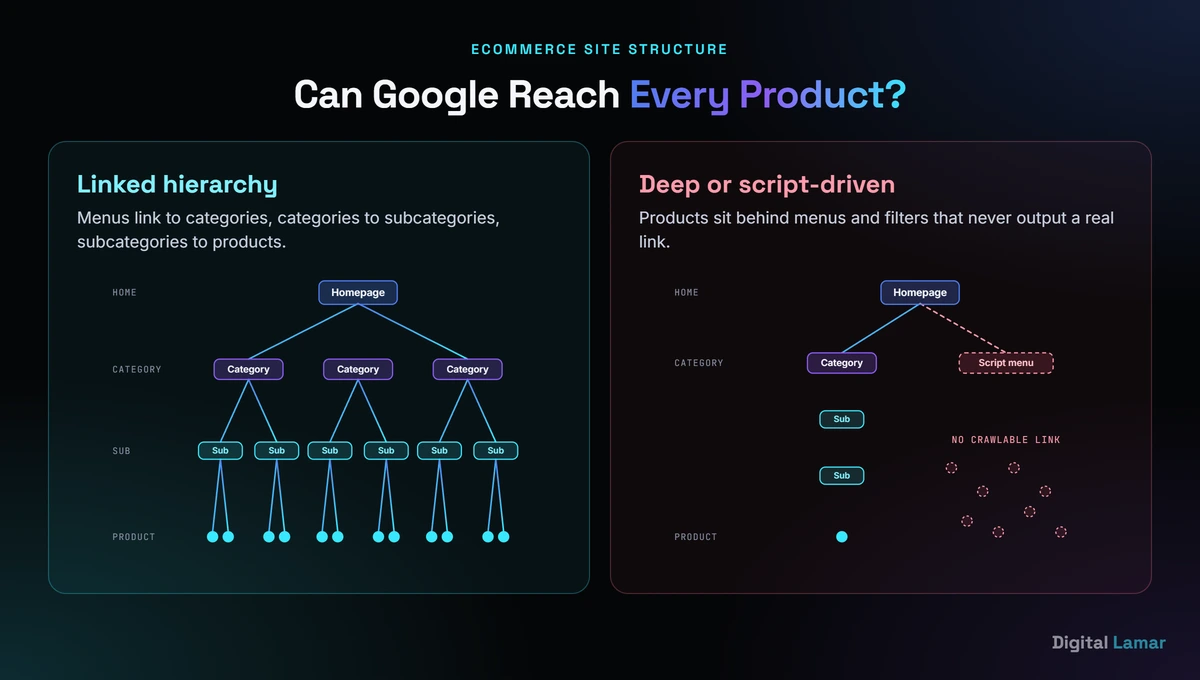
A shallow, linked hierarchy lets Google reach every product. A deep or script-driven one buries them.
Internal links also signal importance. The same Google page says that the more links a page has within a site, the higher its relative importance to other pages, and suggests featuring best-selling products through homepage links. In practice that means your top ten categories deserve a place in the main menu and your bestsellers deserve links from the homepage and from related category pages, not just a spot in a search box that Google cannot use.
How deep is too deep? Shopify’s help center recommends keeping each page “3 clicks away from the home page, wherever possible” (Shopify Help Center, site structure). That is a platform vendor’s rule of thumb, not a Google requirement. The principle holds, though: every extra level is one more place for a link to go missing.
URLs come next, and Google’s guidance here is practical. Use descriptive paths: Google’s own example prefers /product/black-t-shirt-with-a-white-collar over /product/3243. Minimize the number of alternative URLs that return the same content, because duplicates make Google send more requests to your site than it needs to. Keep casing consistent. Use the ?key=value format for parameters. And avoid linking internally to temporary parameters such as session IDs and tracking codes (Google Search Central, ecommerce URL structure, updated December 2025).
Two supporting pieces round out the structure. A sitemap is the safety net Google itself points to when category pages cannot link to every product, so keep it current and have it list only the URLs you actually want indexed. Structured data helps as well: Google recommends adding it to reinforce site structure and help it understand what each page is for, and breadcrumb markup is the usual way to express a category path. Neither replaces real links, but together they give Google three independent routes to the same pages.
Read your own site the way Google would. Click from the homepage to a product in your least-visible category. If you need more than a few clicks, or a menu that only opens on hover with a script, you have found your first fix.
Category and Product Pages: What to Fix on Each
Category pages and product pages do different jobs, and stores that treat them the same tend to under-serve both.
A category page answers a broad shopping query: “running shoes”, “office chairs”, “wireless earbuds”. It needs a clear title, a short piece of copy that tells shoppers and search engines what the category contains, and links to the products and subcategories inside it. A product page answers a narrower, later-stage query and needs the details a buyer checks before paying: what it is, what it costs, whether it is in stock, and what other buyers thought.
Start with the pages you can influence quickest.
- Titles and headings. One clear H1 per page, a title that includes the product or category name in the words a shopper would use, and no two pages sharing the same title.
- Copy that is yours. Manufacturer descriptions are copied across every retailer that stocks the product. A short original paragraph on each important product, and a few lines of intro copy on each category, give Google something it has not seen on a hundred other sites.
- Images. Descriptive file names and alt text, with image sizes that do not slow the page.
- Variants. Google recommends giving variants either a path (
/t-shirt/green) or a parameter (/t-shirt?color=green), and using the URL without the optional parameter as the canonical (Google Search Central, December 2025).
Here is what that looks like on a hypothetical office-chairs category. The page carries a clear title and a short intro paragraph that says who the chairs are for and how to choose between them. It links to subcategories such as ergonomic, executive and mesh chairs, and to the five or six best sellers by name. Every product card is a real link. The filters sit beside the grid and, as the filters section below explains, do not generate a new indexable URL for every combination. A shopper finds what they need in two clicks, and so does Google.
Two category-page problems deserve their own warning. The first is empty categories. Google advises against letting empty category pages get indexed, and suggests a noindex or a 404 status code instead. A shop that keeps every discontinued category live, each showing “no products found”, is teaching Google that parts of the site are thin.
The second is pagination. Google’s guidance is that each page in a paginated list should have its own unique URL, such as ?page=2, and that you should not use the first page as the canonical for the whole sequence: “Instead, give each page its own canonical URL” (Google Search Central, pagination and incremental page loading, updated December 2025). The same page also covers “load more” buttons and infinite scroll: they can work, but only if the products inside them are reachable through real links, since Google does not run your scripts to find them.
Product Structured Data and Merchant Center
Structured data is how you tell Google the facts of a product in a format it can read without guessing: name, price, availability, ratings, shipping.
Google’s documentation on product structured data describes two classes of result. Product snippets suit pages where the shopper cannot buy directly, such as editorial reviews. Merchant listings suit pages where they can, and can show details like apparel sizing, shipping and return policy information. If you add the required properties for merchant listings, your product pages can also become eligible for product snippets (Google Search Central, product structured data, updated December 2025).
Google Merchant Center is the other half. It is a feed of your product data that you submit directly. The product documentation says that providing both structured data on your pages and a Merchant Center feed “maximizes your eligibility” for the richer experiences on Google. Treat them as a pair. Structured data tells Google what each page says. The feed tells Google about every product you want it to know about, including ones its crawler has not found.
Whatever you mark up should match what the shopper sees. Keep price and availability identical in the schema, in the feed and on the page, and update all three together whenever a product changes.
Filters Without Crawl Waste
Filters are where well-run stores lose the most crawl efficiency, and the arithmetic is unforgiving.
Take a shoe category with five colors, six sizes and four price bands. Each filter can be combined with the others, so a single category can generate 120 filtered URLs, most of them showing a near-identical product grid. Multiply that across a catalog with hundreds of categories and the number of URLs Google can discover dwarfs the number of pages worth indexing.
Google describes the cost in two parts: overcrawling, because crawlers visit many faceted URLs before deciding they are useless, and slower discovery of new, useful URLs, because crawl time spent on filters is time not spent on new products (Google Search Central, managing faceted navigation, updated December 2025).
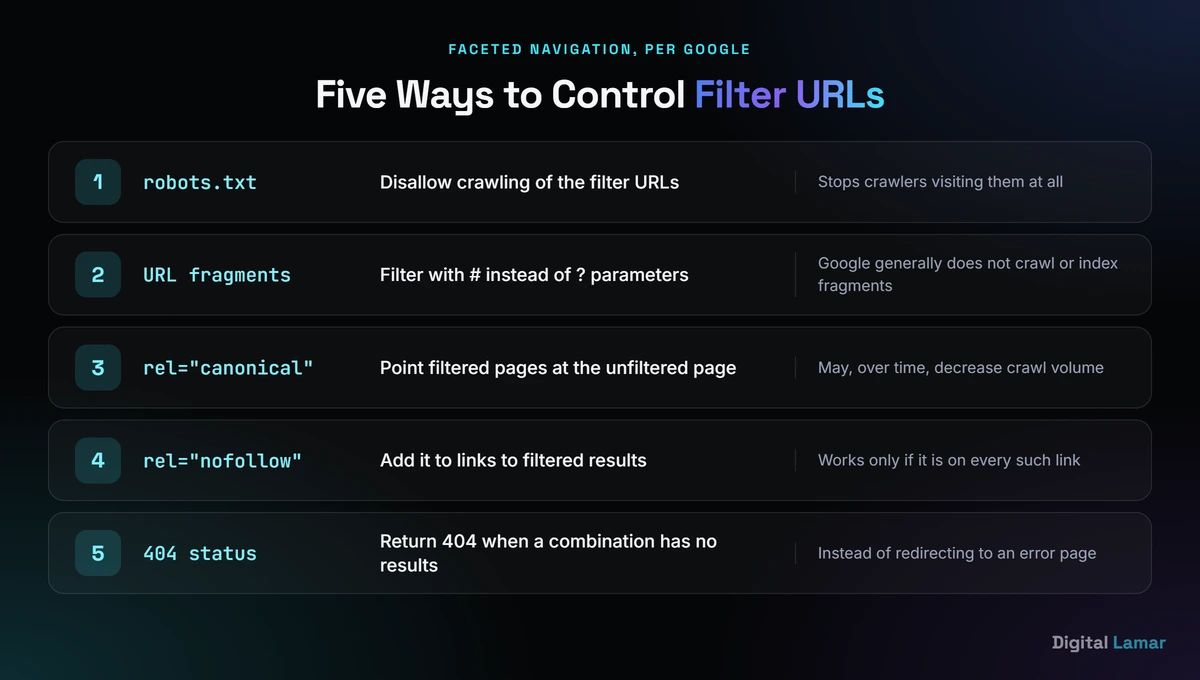
Google’s five documented options for filter URLs, each with a different trade-off.
The same documentation lists the fixes. Block crawling of the filter URLs in robots.txt. Use URL fragments (the part after a #) for filtering, because Google generally does not crawl or index them. Point filtered pages at the unfiltered page with rel="canonical", which may over time decrease crawl volume. Add rel="nofollow" to links to filtered results, though it only works if it appears on every such link. And return a 404 when a filter combination has no results, instead of redirecting to an error page.
There is no single right answer, and the choice depends on whether any filter pages deserve to rank. A filter like “women’s trail running shoes” may carry real search demand and merit its own indexable page. A filter like “size 8, green, under $60, sort by newest” almost never does. The practical rule is to decide filter by filter, then let the platform and your developer implement the decision.
What to Do With Discontinued and Out-of-Stock Products
Every catalog loses products. How you retire them decides whether a page’s authority is kept or thrown away.
Separate the two cases. A product that is temporarily out of stock is still a useful page: it ranks, it holds reviews and links, and it will sell again. Keep it live, show the stock status clearly, and keep the availability in your structured data and feed in step with the page. A product that is gone for good is different. If a close replacement exists, redirect to it. Shopify’s help center lists setting up 301 redirects when moving or discontinuing products among the technical tasks a store owner should monitor (Shopify Help Center, SEO overview). If there is no sensible replacement, send shoppers to the parent category and not to the homepage, because a redirect that lands somewhere irrelevant helps nobody.
Categories need the same care. As covered earlier, Google advises against indexing empty category pages, so a category with no products left should return a 404 or carry noindex and not sit live saying “no products found”.
Watch for URLs that change under you. WooCommerce 10.5 changed how it picks the category used in a product’s permalink when a product sits in several categories: it now selects the deepest category, and it automatically 301 redirects the old URLs to the new canonical one (WooCommerce developer blog, January 2026). The redirect protects you, but it is also a reminder to re-check your sitemap, internal links and feed after any platform update that touches URLs.
Which Ecommerce Platform Is Best for SEO?
This is the question store owners ask most often and the one the ranking guides answer least. Of the ten top-ranking articles we reviewed for this post, only two compared platforms in any real depth (our review, October 2026).
Google’s documentation does not rank platforms, and neither will we. A better question is what each platform lets you control, because SEO on a store is largely a series of small technical decisions. Four questions sort most platforms:
- Can you control your URLs? Product and category paths, and how variants are addressed.
- Can you control indexing? Robots rules, canonical tags and noindex, which are the tools from the filters section.
- Are the basics handled? Sitemaps, structured data and redirects when a product is discontinued.
- Can your team actually run it? The most flexible platform is the worst choice if nobody on your side can safely change it.
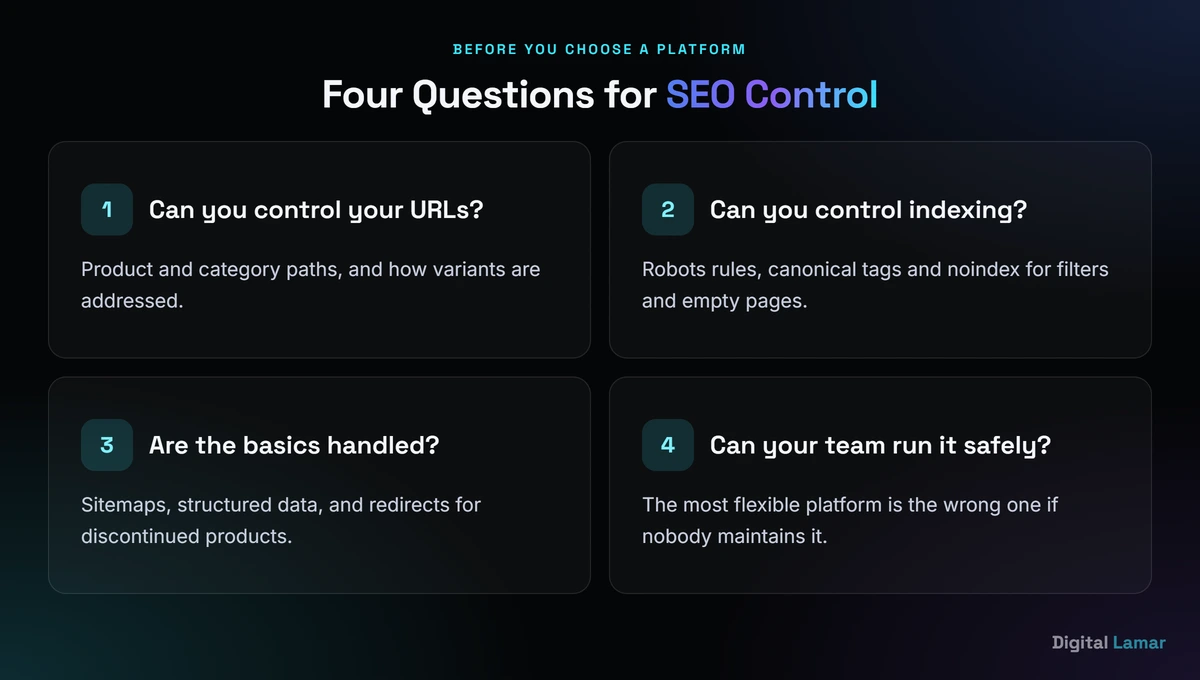
Four questions that matter more than any platform ranking.
Shopify’s help center is a good illustration of a hosted platform that makes many of these decisions for you. It states that canonical tags are generated automatically to prevent duplicate content, that your sitemap.xml and robots.txt files are generated automatically, and that you can edit page titles, meta descriptions and URLs for products, collections, blog posts and pages from the admin (Shopify Help Center, SEO overview). The default robots.txt is described as optimal for SEO. You can customize it through a robots.txt.liquid template, but Shopify calls this an “unsupported customization,” says support cannot help with edits, and warns that incorrect use “can result in loss of all traffic” (Shopify Help Center, editing robots.txt). The trade-off is clear: fewer ways to go wrong, and fewer ways to go your own way.
WooCommerce sits at the other end. Its documentation offers four base options for product URLs: the default, which relies on ID-based addresses such as example.com/?product=111, a shop base, a shop base with category, and a custom base. It also lets you change the product category base from its default of product-category, advises keeping permalinks “as short as possible,” and warns that the product base and category base cannot be identical because WordPress requires them to be unique (WooCommerce documentation, permalinks). More control, more decisions, and more ways to break something with a plugin.
Here is how we would sort real situations. This is judgment, not vendor documentation:
| Your situation | What to lean toward |
|---|---|
| Small catalog, no developer, you want fewer decisions | A hosted platform with sensible defaults, such as Shopify |
| You already run WordPress and have someone who can maintain it | WooCommerce, with a plan for who owns permalinks and plugins |
| Large catalog with many filters | Whichever platform lets a developer control filter URLs and robots rules safely |
| Selling across several countries | The one that handles currencies, languages and separate URLs without workarounds |
Other platforms such as BigCommerce and Adobe Commerce answer the same four questions in their own documentation, and it is worth reading that before you commit. The honest conclusion is that no platform fixes a store that nobody owns. A hosted platform with defaults you never open can outrank a flexible one that nobody maintains.
If you would rather have someone check which of those four questions your store currently fails, Digital Lamar offers a free 30-minute call where we look at your structure and tell you plainly where the problems are.
Content, Links and AI Search for Online Stores
Once the structure is sound, content and links decide how far a store can climb.
The content that tends to work for stores is the content a buyer needs just before a purchase: buying guides, comparison pages, sizing and care guides, answers to the questions that stop a sale. These pages do two jobs. They rank for broader, earlier queries that product pages cannot, and they give you something worth linking to. Each one should link into the categories and products it discusses, so the authority flows toward the pages that earn revenue.
Match each content type to a stage of the journey. Early on, a buying guide such as “how to choose a standing desk” captures shoppers who do not yet know which product they need. Mid-journey, a comparison of two named products helps them narrow down. Late in the journey, sizing, care and returns pages answer the last question standing between a shopper and the checkout. Link each piece to the category that fits its stage, so a reader who finishes the guide lands on a page that sells.
Links follow the same logic.
A store rarely earns links to a category page, because nobody cites “men’s trainers”. It earns them for a useful size guide, a data-backed buying guide, or a story about the product. Look for the places that already mention your brand without linking to it, and for suppliers and distributors who list their stockists.
AI search adds a layer, and the first step for a store is unglamorous. Product facts such as names, specifications, prices and availability are the asset every search surface can reuse, including the AI-driven ones, so we treat complete, consistent product data as the foundation of any AI-search work. Google’s product documentation makes the same point in its own terms: structured data plus a Merchant Center feed “maximizes your eligibility” for richer experiences. We cover the wider picture in our work on AI search optimization, but none of it works on top of messy product data.
The Ecommerce SEO Checklist
Use this as an audit list. Each item traces back to a section above.
- Every product is reachable through real
<a href>links from a category page, and bestsellers are linked from the homepage. - Category and product URLs are descriptive, consistent in casing and free of session IDs or tracking parameters.
- Each variant has a deliberate URL pattern and a canonical that points to the main product URL.
- Empty and discontinued categories return a 404 or carry
noindex. - Paginated category pages each have their own URL and their own canonical.
- Filter URLs are decided one by one: indexable, blocked, canonicalized or removed.
- Category pages have short original intro copy, and top products have original descriptions.
- Product structured data matches the visible page, and a Merchant Center feed is live.
- Redirects are in place for discontinued products with a close replacement.
- Someone on your team owns permalinks, robots rules and plugin updates.
- Search Console is connected and checked for crawl and indexing issues every month.
A checklist is only useful if it has an order. Here is how we would sequence it for a store that has never been audited.
- Week one, reach. Confirm that every important product is reachable through real links, fix the main navigation and make sure the sitemap is current.
- Week two, duplicates. Decide what happens with variants, filters, paginated pages and empty categories, then implement canonicals, noindex or robots rules to match.
- Weeks three and four, pages and data. Rewrite the titles and intro copy on your top categories, add original copy to your best sellers, and bring structured data and the Merchant Center feed in line with the live pages.
- Month two onward, content and links. Publish the buying guides and comparisons that feed those categories, and start earning links to them.
Resist the urge to start with copy and links because they feel productive. If Google cannot reach or trust your structure, better copy is wasted on pages it never sees.
Ecommerce SEO in the US, the UAE and Pakistan
The craft is the same in every market. What changes is how big the market is, how fast it is moving and how crowded the search results are, and the three markets below sit at different stages. We use a different official source for each, so the figures describe different things and should not be set side by side as if they were one measure. Read them as three snapshots of where online selling stands, not as a league table.
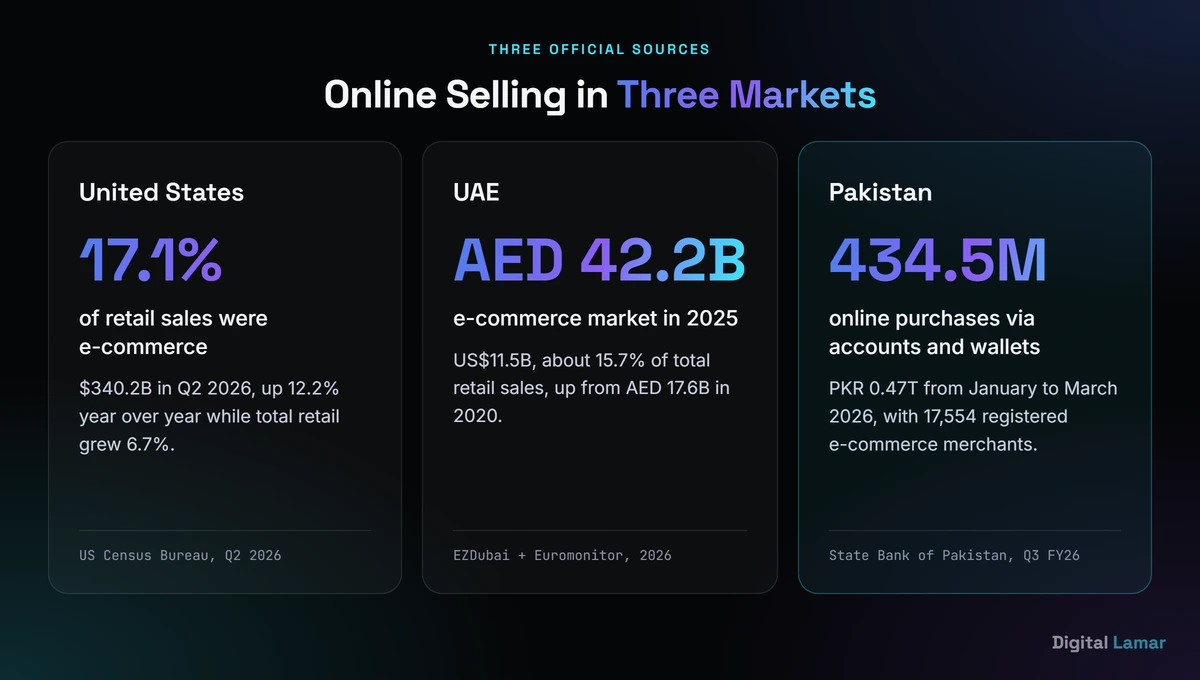
Three markets, three different measures. They are not directly comparable.
United States. Online sales reached $340.2 billion in Q2 2026 and 17.1 percent of retail, seasonally adjusted (US Census Bureau, Q2 2026). The market is large and the competition for “ecommerce seo” itself is vendor-heavy: the same Semrush pull shows platform companies, SEO tool publishers and agencies filling most of the first page. For a store, the lesson is to compete on specific category and product queries and not on the head terms the vendors own. In practice that means winning on category intent and product data quality, which a store controls, and not by trying to out-write a generic guide.
United Arab Emirates. The UAE e-commerce market reached AED 42.2 billion (US$11.5 billion) in 2025, up from AED 17.6 billion in 2020, and accounted for roughly 15.7 percent of total retail sales, with apparel and footwear the largest vertical at AED 11.4 billion (EZDubai Logistics Hub and Euromonitor International, 2026). The report is produced by a logistics hub together with Euromonitor, so we use it for market size and nothing more. On the search side, Semrush shows “ecommerce seo dubai” at 140 monthly searches with a keyword difficulty of 3 (Semrush, October 2026). A low score on one small query does not make the market easy, but it does suggest the Dubai-specific results are less crowded than the global ones. If you want help in that market, see our page for an SEO company in Dubai.
Pakistan. The State Bank of Pakistan’s Payment Systems Quarterly Review for January to March 2026 reports that 434.5 million online purchases worth PKR 0.47 trillion were made through account and wallet payment channels, and that the number of registered e-commerce merchants reached 17,554, up 92 percent in twelve months (State Bank of Pakistan, Payment Systems Quarterly Review, Q3 FY26). The review covers payments made through the banking system, so it says nothing about cash on delivery, and we make no claim about it. Search demand for the term itself is small: Semrush records 170 monthly searches for “ecommerce seo” in Pakistan (Semrush, October 2026). The merchant count is the number that matters. A market that has nearly doubled its registered online sellers in a year is one where being found early is likely to be easier than being found late. For help locally, see our SEO company in Pakistan page.
Do It Yourself or Hire Help?
Plenty of store owners can handle the basics themselves, and the checklist above is written for them. Do it yourself while the catalog is small, the platform is hosted and the problems are obvious: thin product copy, missing alt text, a messy menu.
Bring in help when the problems stop being visible from the front end. Large catalogs with filters, a platform migration, thousands of discontinued products, a Merchant Center feed that keeps getting disapproved, or a drop in indexed pages that nobody can explain. These are the situations where a mistake is expensive and the fix needs someone who has seen it before.
If you decide to hire, know what you are buying. Our guide to how much does SEO cost breaks down what retainers, projects and hourly work typically cover, and our piece on the red flags when hiring a marketing agency lists the claims to be wary of, from guaranteed rankings to unclear asset ownership.
Digital Lamar’s work for online stores sits inside our SEO (Search Engine Optimization) practice and our ecommerce marketing agency work, and we start where this guide does: an audit of structure, filters and feeds before anyone writes a word of copy.
Key Takeaways
- US online retail grew 12.2 percent year over year in Q2 2026 against 6.7 percent for total retail, and now makes up 17.1 percent of US retail sales (US Census Bureau, 2026).
- Make sure Google can reach every product through real links: Google says category pages that do not link to all their products can leave some undiscovered (Google Search Central, 2025).
- Treat filters deliberately. Google documents five ways to control faceted URLs: robots.txt, URL fragments, canonicals, nofollow and 404s.
- Give variants a clear URL pattern, give paginated pages their own URLs and canonicals, and keep empty categories out of the index.
- Use product structured data and a Merchant Center feed together, and keep both matched to what the shopper sees.
- The best platform is the one your team can maintain: Shopify’s defaults lock decisions in, WooCommerce hands them to you.
Not sure whether your store’s structure, filters and product feed are helping or hurting? Digital Lamar will walk through it with you, no obligation.
Book a free 30-min strategy callFrequently Asked Questions
Why is SEO important for ecommerce?
Because online retail is a growing share of all retail, and search is one of the ways shoppers find products. US e-commerce grew 12.2 percent year over year in Q2 2026 and made up 17.1 percent of retail sales (US Census Bureau, 2026). Search is also the place where a store competes on specific product and category queries without paying for every click, which is why a structural fix on a store tends to pay back across thousands of pages at once.
Which ecommerce platform is best for SEO?
None wins outright. The useful test is what a platform lets you control: URLs, indexing rules, structured data and sitemaps, and whether your team can safely maintain it. Shopify generates canonical tags, a sitemap and robots rules automatically and warns that editing robots.txt is unsupported. WooCommerce gives you full control of permalinks and leaves the maintenance to you. Choose the one whose trade-offs match your team, and write down who owns the technical settings after launch.
How do I do SEO for an ecommerce website?
Work in this order. Make every product reachable through real links, tidy your URLs, decide how filters are handled, improve category and product pages, add product structured data and a Merchant Center feed, then build content and links around the categories that earn revenue. The checklist and the four-step schedule in this guide turn that into audit items you can tick off, starting with reach and duplicates before any copywriting.
Do ecommerce sites need SEO and PPC?
Most stores benefit from both, for different jobs. Paid ads buy immediate visibility on products you want to push. SEO builds visibility on category and product queries that keeps paying without a per-click cost. Our comparison of Google Ads vs SEO explains how to decide which to start with.
How much does ecommerce SEO cost?
It depends on catalog size, platform, market and scope, and the range is wide. Our guide to how much does SEO cost sets out the pricing models, what each budget tier typically buys and the figures we could verify for the US, the UAE and Pakistan.
Is an ecommerce SEO audit worth doing?
Yes, once a store has outgrown the obvious fixes. An audit is most valuable when you have a large catalog, filters, a migration coming or unexplained drops in indexed pages, because those problems cannot be seen from the front end. For a small store with a handful of products, the checklist above covers most of what an audit would find.