
On this page
- What Is WhatsApp Marketing?
- WhatsApp Business App vs WhatsApp Business API
- How WhatsApp Marketing Works on the Business Platform
- How Much Does WhatsApp Marketing Cost?
- WhatsApp Marketing Rules: Opt-In, Limits and Quality
- WhatsApp Marketing Tools and Software
- How to Start WhatsApp Marketing Step by Step
- WhatsApp Marketing Examples for Pakistan and UAE
- WhatsApp Marketing vs SMS and Email
- WhatsApp Marketing Mistakes to Avoid
- When to Get Help With WhatsApp Marketing
- Key Takeaways
- Frequently Asked Questions
In short
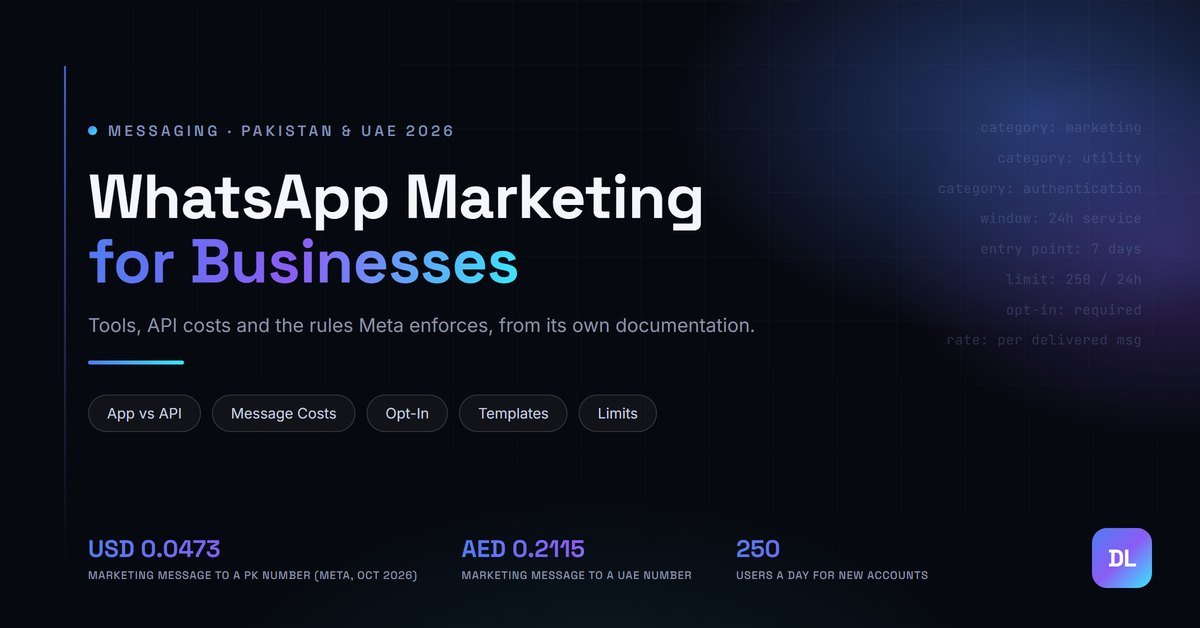
WhatsApp marketing means sending offers, updates and support to customers who opted in to hear from you on WhatsApp. Small businesses can start with the free WhatsApp Business app. Anything at scale runs on Meta’s WhatsApp Business Platform (the API), which charges per delivered message: from 1 October 2026, USD 0.0473 for a marketing message to a Pakistani number (about PKR 13.09) and AED 0.2115 to a UAE number.
A shoe retailer in Lahore exports 4,000 numbers from its point-of-sale system, loads them into a “bulk sender” it found online, and blasts an Eid sale. By evening the number is restricted. Half the list never saved the shop’s number, dozens tapped “block”, and the tool was never an official route to WhatsApp in the first place.
Nothing about that campaign was unusual. That’s the problem.
WhatsApp is where customers in Pakistan and the UAE already talk to shops, clinics, developers and delivery riders, so it looks like the easiest marketing channel there is. It isn’t free of rules, though. Meta changed how it charges businesses in July 2025, changed it again on 1 October 2026, and enforces opt-in, template approval and sending limits that most “WhatsApp marketing” tutorials skip. This guide covers all of it from Meta’s own documentation, with every rate taken from Meta’s official rate card. Digital Lamar wrote it for businesses in Pakistan and the UAE that want WhatsApp to bring in sales without losing the number.
What Is WhatsApp Marketing?
WhatsApp marketing is the use of WhatsApp to reach customers with promotions, product updates, reminders and support, sent to people who have agreed to receive your messages. It runs on two official tools: the free WhatsApp Business app for small teams on one device, and the paid WhatsApp Business Platform (API) for messaging at scale.
The channel covers more than promotional blasts. A good WhatsApp setup handles the whole customer conversation: the first enquiry from a Click-to-WhatsApp ad, a catalog link, an order confirmation, a delivery update, a feedback request and, months later, a re-order reminder. Meta’s platform splits these into separate message categories with separate prices, which is why it pays to understand the categories before you plan a campaign. The reach is there in both markets. Pakistan had 117 million internet users in October 2025 and the UAE 11.3 million, a 99% penetration rate, according to DataReportal’s Digital 2026 reports. For the latest platform numbers, see our report on social media users in Pakistan.
Does WhatsApp Marketing Work?
WhatsApp marketing works when messages go to people who asked for them and each message is useful to that person. Meta builds this into the system: user blocks and reports lower your quality rating, low-rated templates get paused, and businesses with poor feedback can lose sending capacity. Relevance is a requirement here, not a nice extra.
That cuts both ways. The same personal inbox that makes WhatsApp feel effective makes careless messages costly.
WhatsApp Business App vs WhatsApp Business API
The WhatsApp Business app is a free-to-download app for small businesses that talk to customers from a single device. The WhatsApp Business Platform, usually called the WhatsApp Business API, is for medium and large businesses that message customers at scale through programmatic access, and it charges per delivered message. WhatsApp’s own business site draws the line as “hundreds of customers” for the app versus “millions” for the Platform.
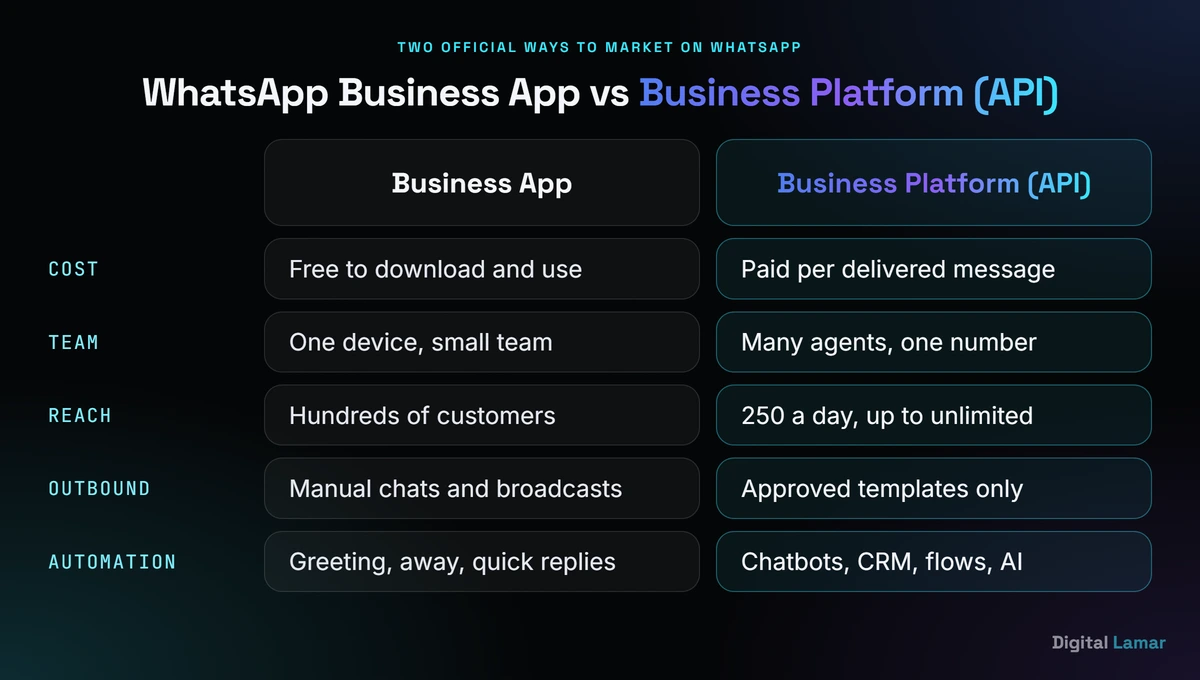
The app is a phone tool. The Platform is infrastructure you connect to a CRM, store or chatbot.
| Feature | WhatsApp Business app | WhatsApp Business Platform (API) |
|---|---|---|
| Who it’s for | Small businesses, one device | Medium and large businesses, any team size |
| Cost | Free to download and use; business broadcasts are a paid add-on | Per delivered message, by category and recipient country |
| Messages outside a customer chat | Manual chats and broadcasts | Approved message templates only |
| Automation | Greeting and away messages, quick replies | Chatbots, CRM triggers, flows, AI agents |
| Scale | Hundreds of customers | 250 unique users a day at first, rising to unlimited |
| How you get it | Download from your app store | Directly from Meta, or through a Meta Business Partner |
When Is the Free WhatsApp Business App Enough?
The free WhatsApp Business app is enough when one person or a small team answers chats from one phone, your customers message you first, and you send offers to a few hundred people at most. It gives you a business profile, product showcase, greeting and away messages, and quick replies at no cost.
A home bakery in Karachi or a single-branch salon in Dubai often never needs more. The limits show up when two staff need the same inbox, when you want order updates sent automatically from your store, or when your list grows past what one phone can handle. Note that Meta announced in April 2025 that “business broadcasts” in the app would become a paid feature, so check the Tools section of your app to see whether paid broadcasts are live in your country.
When Do You Need the WhatsApp Business API?
You need the WhatsApp Business API when messages must be sent automatically (order confirmations, appointment reminders, abandoned-cart nudges), when several agents share one number, when you want a chatbot or CRM connected, or when you need to message thousands of opted-in customers. The trade-off is that every business-started message needs an approved template and is paid.
Access comes two ways: through a Meta Business Partner that handles setup for you, or directly through Meta’s Cloud API if you have developers. Meta charges no extra fee for direct access.
How WhatsApp Marketing Works on the Business Platform
On the WhatsApp Business Platform, a business can message a customer in two situations: freely, inside a 24-hour customer service window that opens when the customer messages you, or at any time using a pre-approved message template sent to someone who opted in. Every template belongs to one category (marketing, utility or authentication), and the category sets the price.
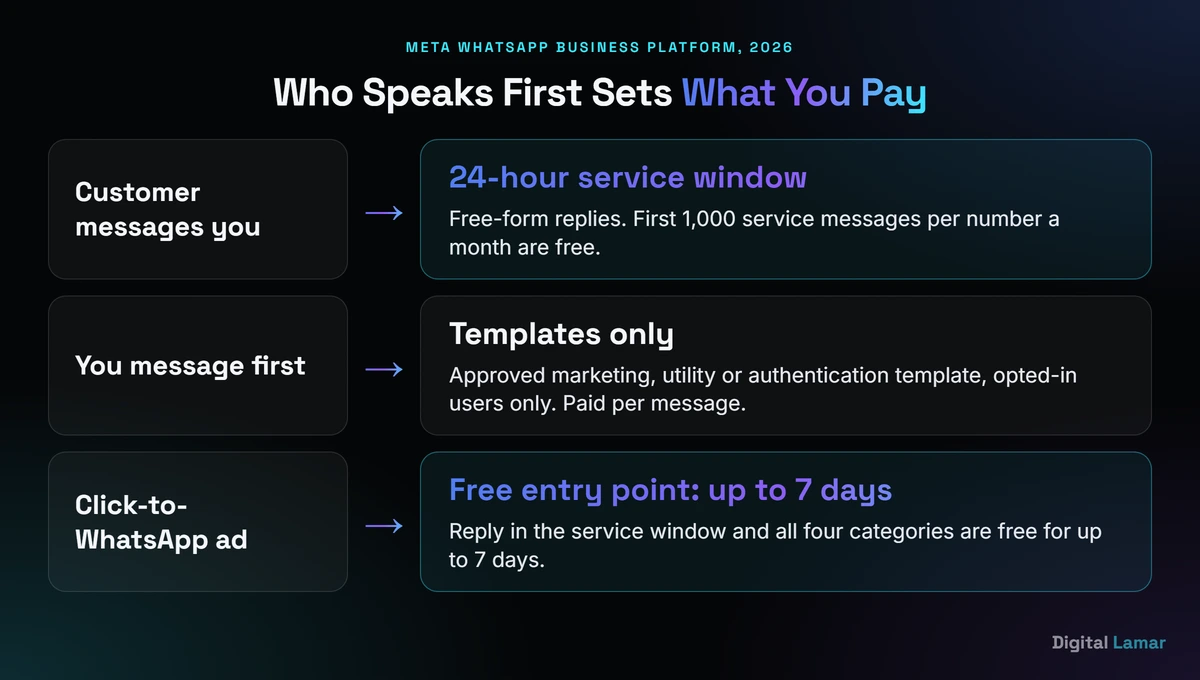
Who speaks first decides what you can send and what you pay.
What Is the WhatsApp 24-Hour Customer Service Window?
The WhatsApp 24-hour customer service window opens when a user messages or calls your business, and each new message from the user resets it to 24 hours. While it’s open you can send free-form, non-template messages. Once it closes, you can only reach that person with an approved template, and only if they opted in (Meta, 2026).
This one rule shapes most WhatsApp strategy. Campaigns that make customers message first, such as “Send HI to get the menu” or a Click-to-WhatsApp ad, open the window and let your team reply naturally instead of through rigid templates.
WhatsApp Marketing vs Utility vs Authentication Messages
Marketing templates cover offers, retargeting and anything mixed or unclear. Utility templates must be non-promotional and tied to something the user did or requested, like an order update. Authentication templates carry one-time passcodes only. Service messages are free-form replies inside the 24-hour window, and Meta added a Meta Business Agent category for its AI agent on 1 July 2026.
The split matters because the rates differ by more than three times in Pakistan. Meta’s template categorization rules (Meta, 2026) say a template with mixed content counts as marketing, and since 9 April 2025 a utility template that Meta judges promotional is approved as marketing by default.
So “Your order has shipped! Use code EID20 for 20% off your next order” is billed as marketing, not utility.
How Does WhatsApp Template Approval Work?
You submit each template with a name, language, category and content, and Meta reviews it. It shows PENDING during review, then APPROVED or REJECTED, for example with the reason INCORRECT_CATEGORY when Meta disagrees with your category. Rejected templates can be edited and resubmitted, and you can request a category review within 60 days.
Repeat misuse escalates: a warning, then rate limits on utility messages, then a utility template suspension, then a 30-day restriction on the whole business portfolio.
How Much Does WhatsApp Marketing Cost?
WhatsApp marketing on the Business Platform costs a fixed rate per delivered message, set by category and the recipient’s country code. From 1 October 2026, Meta charges USD 0.0473 for a marketing message to a Pakistani number and USD 0.015 for a utility or authentication message. To a UAE number, it’s AED 0.2115 for marketing and AED 0.0576 for utility.
Two details catch people out. The rate follows the customer’s number, not your business address, so a Lahore exporter messaging a buyer in Dubai pays the UAE rate. And any guide still quoting “per 24-hour conversation” prices is out of date.
WhatsApp Marketing Message Cost in Pakistan
A WhatsApp marketing message delivered to a Pakistani number costs USD 0.0473 from 1 October 2026, about PKR 13.09 at the State Bank of Pakistan rate. Utility, authentication and charged service messages cost USD 0.015 each, about PKR 4.15. Meta bills in USD, AED and 14 other currencies, but not in PKR, so a Pakistani business usually pays in dollars by card.
The conversion uses the State Bank of Pakistan’s M2M revaluation rate of PKR 276.7736 per US dollar on 28 October 2026. All rates below come from Meta’s USD and AED rate cards, effective 1 October 2026, linked from its WhatsApp Business Platform pricing page (Meta, 2026).
| Message category | To a Pakistani number (USD) | Approx. PKR | To a UAE number (AED) |
|---|---|---|---|
| Marketing | 0.0473 | 13.09 | 0.2115 |
| Utility | 0.015 | 4.15 | 0.0576 |
| Authentication | 0.015 | 4.15 | 0.0576 |
| Authentication-international | 0.075 | 20.76 | 0.1872 |
| Service (after 1,000 free per number a month) | 0.015 | 4.15 | 0.0576 |
Source: Meta WhatsApp Business Platform rate cards, effective 1 October 2026. PKR at SBP M2M rate 276.7736, 28 October 2026.
PKR 65,457 is what 5,000 delivered marketing messages to Pakistani numbers cost at Meta’s October 2026 rate (USD 236.50). The same 5,000 messages sent as genuine utility updates cost USD 75, less than a third (Meta rate card, 2026).
Volume discounts exist, but only for utility and authentication messages. In Pakistan the list rate applies to the first 150,000 utility messages a month, and the rate drops 5% from message 150,001, with further steps beyond 1 million. Marketing messages have no volume tiers.
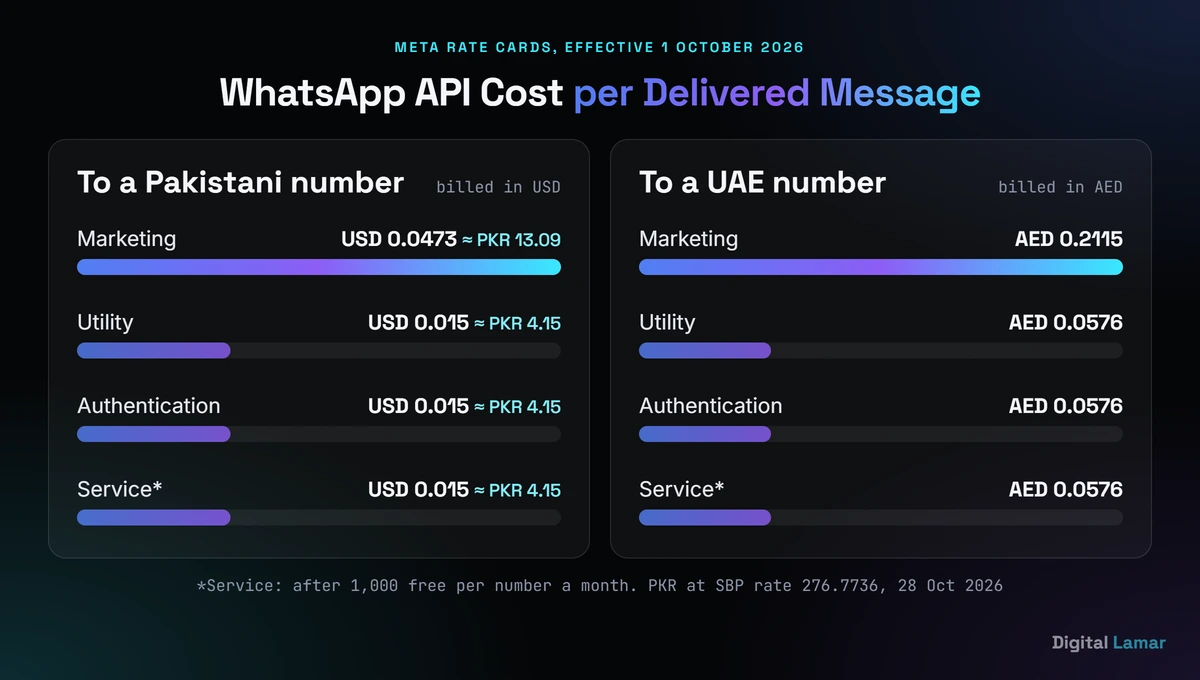
Marketing messages cost about three times as much as utility messages to the same Pakistani number.
WhatsApp Business API Pricing in the UAE
WhatsApp Business API pricing for UAE numbers, effective 1 October 2026, is AED 0.2115 per marketing message and AED 0.0576 per utility, authentication or charged service message, on Meta’s AED rate card. In US dollars the marketing rate is USD 0.0576. UAE businesses can be billed directly in AED, one of the 16 currencies Meta supports.
For a UAE retailer, 5,000 marketing messages to local customers come to AED 1,057.50.
What Changed in WhatsApp Pricing in 2025 and 2026?
Meta moved WhatsApp from per-conversation to per-message pricing on 1 July 2025 and added volume tiers for utility and authentication. On 1 October 2026 it began charging for service messages beyond 1,000 free per phone number each month, and for utility templates sent inside an open customer service window, which had been free since July 2025.
Several other 2026 changes matter to marketers. Pakistan’s rates were updated on 1 April 2026. The Meta Business Agent category launched on 1 July 2026 at USD 2.00 per million tokens, which Meta estimates at roughly 4 to 5 US cents for a typical message. Meta also warned that businesses with no payment method on file by 30 September 2026 would stop having service messages delivered, so check your billing setup in WhatsApp Manager.
How to Get Free WhatsApp Messages With Click-to-WhatsApp Ads
When a customer messages you from a Click-to-WhatsApp ad on the Android or iOS app and you reply within the customer service window, Meta opens a free entry point window lasting up to 7 days. Inside it, marketing, utility, authentication and service messages are all free. Meta Business Agent messages are still charged.
That makes ads that start a chat one of the cheapest ways to run WhatsApp marketing. You pay for the ad, then follow up for a week at no message cost. If you already run Meta campaigns, our Paid advertising (PPC) team can tell you whether a Click-to-WhatsApp objective fits your sales process.
Want a second opinion on your WhatsApp setup or costs before you commit? Book a free 30-minute call with Digital Lamar and we’ll look at which message categories you’d actually be paying for.
WhatsApp Marketing Rules: Opt-In, Limits and Quality
WhatsApp marketing has three sets of rules: you may only message people who gave you their number and opted in to hear from you, Meta caps how many unique users you can reach outside customer chats each day, and quality ratings based on customer feedback can pause templates or reduce your capacity. Breaking them costs more than any message fee.
What Opt-In Does WhatsApp Require?
WhatsApp’s Business Messaging Policy says you may contact people only if they gave you their mobile number and opted in to receive your messages. Meta’s developer guidance adds that the opt-in must make clear the person is agreeing to messages from your named business. You choose the method, and you’re “solely responsible” for it meeting the law.
The WhatsApp Business Messaging Policy (updated 23 September 2026) also requires you to honour every opt-out “either on or off WhatsApp”. A till export or scraped directory is not opt-in.
What Are WhatsApp Messaging Limits?
A WhatsApp messaging limit is the maximum number of unique users your business can deliver messages to outside customer service windows in a moving 24-hour period. New business portfolios start at 250. The next levels are 2,000, 10,000, 100,000 and unlimited, and the limit is shared across all phone numbers in your business portfolio.
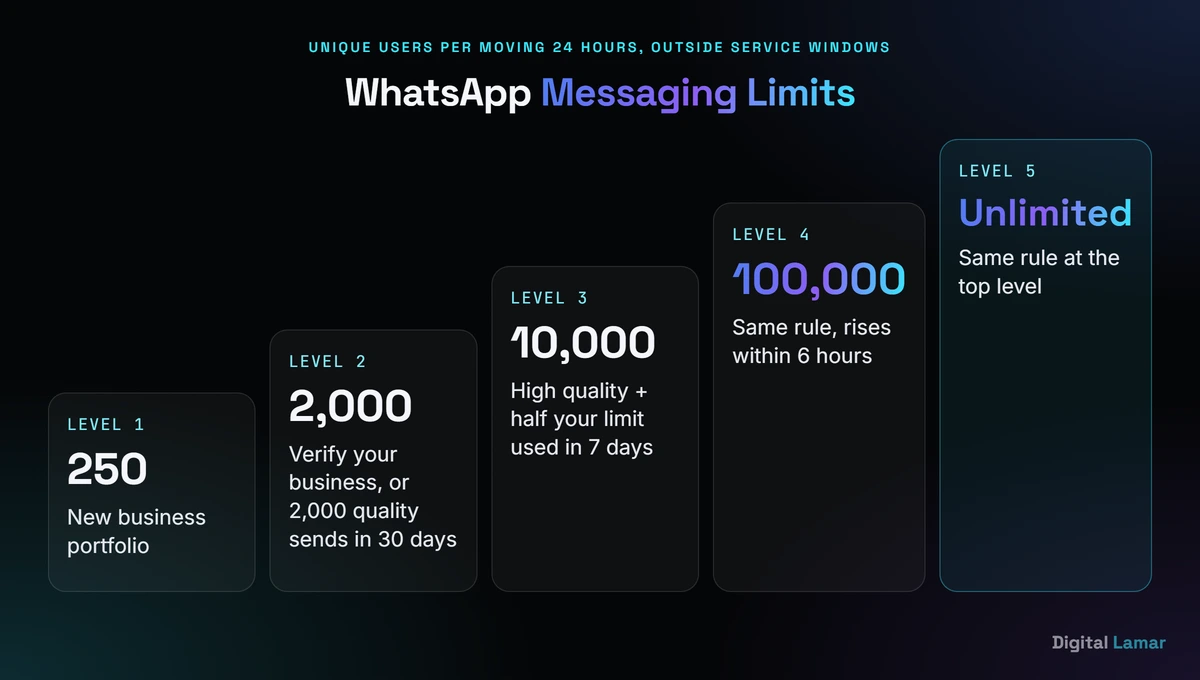
The limit counts unique people per 24 hours, not messages, and only outside open chats.
To reach 2,000, Meta’s messaging limits documentation (Meta, 2026) lists three paths: verify your business, have the partner that onboarded you verify it, or deliver 2,000 messages to unique users outside service windows within 30 days using high-quality templates. Beyond that, your limit rises one level within 6 hours once you’ve used at least half of it in the last 7 days and your quality stays high.
How WhatsApp Quality Ratings and Template Pausing Work
WhatsApp rates your templates on customer feedback, such as blocks and low engagement. When a template drops to the lowest rating, shown as “Active – Low quality”, Meta pauses it for 3 hours the first time and 6 hours the second. The third time, the template is disabled and must be edited and resubmitted.
New templates are also paced: Meta holds part of the send while it reads feedback, so a bad template fails small.
Is WhatsApp Marketing Legal in Pakistan and the UAE?
WhatsApp marketing is legal in both countries when you follow WhatsApp’s own policy and local law. In Pakistan, WhatsApp’s opt-in and content policy is the baseline, and regulated sectors like banking should check their own rules. In the UAE, telemarketing is regulated by Cabinet Resolution No. 56 of 2024, with penalties set by Resolution No. 57 of 2024.
The UAE government portal’s consumer protection page (u.ae, 2026) says Resolution No. 56 aims to reduce unwanted marketing calls and sets the channels and times companies must follow. Ask a UAE legal adviser whether it covers your campaign.
WhatsApp Marketing Tools and Software
WhatsApp marketing tools fall into four groups: the free WhatsApp Business app; Meta’s own Cloud API with WhatsApp Manager; software from Meta Business Partners that adds a shared inbox, campaign sender, chatbot builder and CRM sync on top of the API; and unofficial “bulk sender” extensions that automate a personal or Business app account.
Only the first three are official.
Types of WhatsApp Marketing Software
WhatsApp marketing software built on the official API usually bundles a shared team inbox, template management, contact segmentation, campaign scheduling, chatbot or flow builders, integrations with Shopify, WooCommerce or a CRM, and reporting on replies. Most businesses that outgrow the app choose this over building on the Cloud API.
Pricing models differ: some partners charge a monthly subscription, some add a margin per message, some do both. Ask every vendor to show Meta’s rate and their own fee as separate lines.
Are WhatsApp Bulk Message Sender Tools Safe?
Bulk message sender extensions and “free unlimited” tools are not part of Meta’s official platform. They automate a normal WhatsApp or WhatsApp Business app account to message many people, usually people who never opted in. That breaks WhatsApp’s policy, and Meta can limit or remove access for businesses that get significant negative feedback.
The real cost is the number.
If customers know your shop by one WhatsApp number printed on bags, signs and invoices, losing it costs far more than a year of official API messages.
How to Choose a WhatsApp Business Solution Provider
Choose a WhatsApp Business Solution Provider by first confirming it is a Meta Business Partner in Meta’s partner directory, then checking that it shows Meta’s message rates separately from its own fees, supports your stack (Shopify, WooCommerce, your CRM), offers a shared inbox and flows, and lets you keep ownership of your phone number and WhatsApp Business account.
Ownership is the point most people skip. Your WhatsApp Business account should sit in your own Meta business portfolio, so you can move to another provider later without losing the number, its quality history or your approved templates.
How to Start WhatsApp Marketing Step by Step
To start WhatsApp marketing, set one clear goal, pick the app or the API based on volume, collect documented opt-ins, verify your business with Meta, write and submit templates in the right category, then test on a small segment and measure replies and blocks before scaling. Skipping the opt-in step is what gets most numbers restricted.
- Pick one goal. Leads from ads, repeat orders, appointment reminders or support. Each needs different templates.
- Choose the app or the API. Use the app if one person can handle it. Use the API for automation, multiple agents or thousands of contacts.
- Collect opt-in properly. Add a WhatsApp checkbox to checkout and forms, naming your business and the kind of messages you’ll send.
- Verify your business. Verification is one route from the 250 starting limit to 2,000.
- Write templates by category. Keep utility messages free of offers, and keep authentication for passcodes only.
- Start chats with ads. Click-to-WhatsApp ads open a free entry point window of up to 7 days.
- Test, then scale. Send to a small segment, watch blocks and quality, and fix copy before the full send.
Measure what matters. Delivered and read counts are useful, but replies, orders and blocks tell you whether the campaign worked. Track opt-outs per send, and cut frequency if they climb.
WhatsApp Marketing Examples for Pakistan and UAE Businesses
The WhatsApp marketing campaigns that fit Pakistani and UAE businesses best are Click-to-WhatsApp ads that start a sales chat, order and delivery updates for ecommerce, appointment reminders for clinics and salons, property enquiry follow-ups, and seasonal offers for Ramadan, Eid, White Friday and the Dubai Shopping Festival, sent only to opted-in customers.
A few patterns we’d suggest testing:
- Cash-on-delivery confirmation (Pakistan ecommerce). A utility template asks the customer to confirm a COD order before dispatch, which can cut wasted shipments. Keep the message free of offers so it stays utility.
- Property enquiry follow-up (UAE real estate). A Click-to-WhatsApp ad for a project starts the chat, an agent qualifies the buyer inside the 24-hour window, and follow-ups run free inside the 7-day entry point window.
- Appointment reminders (clinics and salons). A utility reminder with “confirm” and “reschedule” buttons the day before reduces no-shows without any promotional content.
- Seasonal offer to past buyers. A marketing template with a catalog link, sent only to customers who opted in to offers, in Urdu, English or Arabic to match the customer.
- Re-order nudges. For consumables like skincare or pet food, a marketing message timed to when the last order should be running out.
Ecommerce stores get the most from pairing WhatsApp with search traffic: ecommerce SEO brings first-time buyers in, and WhatsApp turns them into repeat customers.
WhatsApp Marketing vs SMS and Email Marketing
WhatsApp marketing beats SMS and email on rich content and two-way conversation, because customers can reply, browse a catalog and order in the same chat. Email is cheaper per send and better for long content. SMS works without internet. WhatsApp’s per-message fee and strict opt-in rules make it best for high-value, timely messages rather than newsletters.
| Factor | SMS | ||
|---|---|---|---|
| Two-way chat | Native, with buttons and catalogs | Basic text replies | Slow, often unread replies |
| Rich media | Images, video, documents, flows | Text only (unless MMS/RCS) | Full HTML |
| Cost model | Per delivered message, by category | Per message, by carrier route | Per contact or subscription |
| Approval | Templates reviewed by Meta | Sender rules vary by country | None, but spam filters apply |
| Best for | Sales chats, updates, reminders | OTPs, alerts without data | Newsletters, long content |
Most businesses don’t need to choose. Use email for content, WhatsApp for conversations and time-sensitive updates, and SMS as a fallback.
WhatsApp Marketing Mistakes to Avoid
The most common WhatsApp marketing mistakes are messaging people without opt-in, using unofficial bulk senders, hiding offers inside utility templates, sending the same promotion too often, ignoring opt-out requests, and building on a provider-owned account you can’t take with you. Each one either raises costs or risks the number.
One more is new this year: assuming service replies are free. Beyond 1,000 a month per number, they’ve been charged since 1 October 2026.
When to Get Help With WhatsApp Marketing
Get help with WhatsApp marketing when you’re moving from the app to the API, connecting WhatsApp to your store or CRM, running Click-to-WhatsApp ads at scale, or seeing paused templates and low quality ratings. A partner or agency should explain the setup, keep the account in your name, and show Meta’s fees separately.
WhatsApp works best as one part of a wider plan. Digital Lamar’s Social media marketing service covers the organic channels that feed it, and businesses in Pakistan can see our local offer on the digital marketing agency in Pakistan page, while UAE businesses can visit our digital marketing agency in Dubai page. If you’re comparing several providers, our guide on how to choose a digital marketing agency lists the questions to ask.
For related reading, see what digital marketing is and how much social media marketing costs.
Key Takeaways
- The WhatsApp Business app is free for small teams on one device. The WhatsApp Business Platform (API) is for automation and scale, and it’s paid per delivered message.
- From 1 October 2026, a marketing message costs USD 0.0473 to a Pakistani number (about PKR 13.09) and AED 0.2115 to a UAE number.
- Utility and authentication messages cost USD 0.015 in Pakistan, less than a third of the marketing rate, but promotional content turns a utility template into marketing.
- Service messages are free up to 1,000 per number a month, and Click-to-WhatsApp ads open a free window of up to 7 days.
- You may only message people who opted in to hear from your named business, and you must honour opt-outs.
- New accounts can reach 250 unique users a day outside customer chats; verification and good quality unlock 2,000 and beyond.
Want WhatsApp Marketing That Doesn’t Put Your Number at Risk?
Book a free 30-minute call with Digital Lamar. We’ll look at your customer list, your opt-in sources and your goals, and tell you whether the free app is enough or the API is worth the cost.
Book a free 30-min strategy callFrequently Asked Questions
Is WhatsApp marketing free?
WhatsApp marketing is free on the WhatsApp Business app for one-to-one chats, though business broadcasts are becoming a paid feature. On the WhatsApp Business Platform, marketing, utility and authentication templates are paid per delivered message, while service replies are free up to 1,000 per number a month.
How much does a WhatsApp marketing message cost per month?
There’s no monthly fee from Meta; you pay per delivered message. A month of 5,000 marketing messages to Pakistani numbers costs USD 236.50, about PKR 65,457, at October 2026 rates. Partner software adds its own subscription or markup on top of Meta’s charges.
Can I send bulk WhatsApp messages without the API?
You can send broadcasts from the WhatsApp Business app, but only to people who opted in, and Meta is turning business broadcasts into a paid feature. Unofficial bulk sender tools that automate the app break WhatsApp’s policy and can get your number restricted or banned.
What is the difference between WhatsApp marketing and utility messages?
Marketing messages promote, announce or re-engage. Utility messages are non-promotional and tied to something the user did or asked for, like an order update. Any promotional content in a utility template makes Meta treat it as marketing, which costs about three times more in Pakistan.
How long does WhatsApp template approval take?
Meta’s documentation doesn’t publish a fixed review time for template approval. A submitted template shows PENDING while under review, then APPROVED or REJECTED. Simple, clearly categorised templates tend to pass first time, and rejected ones can be edited and resubmitted.
Can a Pakistani business use the WhatsApp Business API?
Yes. Pakistani businesses can access the WhatsApp Business Platform directly through Meta’s Cloud API or through a Meta Business Partner. Meta doesn’t bill in PKR, so payment is usually in USD by card, and messages to Pakistani numbers are charged at Meta’s Pakistan rates.